
Search Console branded queries are searches that include your business name. Google's branded queries filter separates them automatically, but Google says it "isn't available for sites with a low number of impressions", and it skips folder and subdomain properties. On 21 October 2026 we confirmed it is missing from the filter menu of a small property. The alternative works for everyone: a brand regex listing your name and its typos, applied with Matches regex for brand searches and Doesn't match regex for the rest. Expect the two views not to add up to your total.
Search Console behaviour last checked 21 October 2026. The figures in this guide are example data for Anytown Plumbing, an invented Kent firm, not from any real property.
Three rules apply to every Search Console regex (Google's help):
- RE2 engine. It has no lookaheads, so "everything except my brand" is done with Doesn't match regex, not inside the pattern.
- Partial match. A pattern matches anywhere in the search unless you add
^(starts with) or$(ends with), so a short piece of your name can match other words. - Not case-sensitive. "Anytown" and "anytown" are the same, so you do not need
(?i). Data Studio is the opposite.
Why split brand from non-brand
Someone who types your business name already knows you. They heard about you from a customer, saw your van or your Google Business Profile, or came back to find your number. Those searches matter, but they measure your reputation and your offline marketing more than your SEO.
Non-brand searches are the opposite: people looking for what you do, such as "electrician dartford" or "how much does a website cost", who had not heard of you. Google draws the same line in its branded filter announcement, where it describes non-branded queries as the ones that show how new people find your content.
If you only look at total clicks, a good month for word of mouth can hide a bad month for SEO, and the other way round. Splitting them gives you one number for "people who know us" and one for "people who found us".
Google's branded queries filter: what it is and who gets it
Google announced the branded queries filter on 20 November 2025 and made it available to all eligible sites on 11 March 2026. It splits the Performance report into Branded and Non-branded views. Google says the split is not based on a regular expression: an internal, AI-assisted system decides, and it counts your name, its misspellings and searches for products or services unique to you.
It is not offered to everyone:
- Top-level properties only. Google excludes properties for a single folder (such as
https://example.com/shop/) and for a subdomain (such asshop.example.com). A whole-site property, including a URL-prefix one, is not excluded by that rule. - Enough data. Google's help says the filter "isn't available for sites with a low number of impressions" (Search Console Help).
- It can get things wrong. The same help page warns that "some queries might be incorrectly identified", and Google describes no way to see or edit which searches it counts as branded.
When we checked a small property on 21 October 2026, the branded filter was not offered. The + Add filter menu showed Query, Page, Country and Device, and the Query dialog had no branded option. Search Console does not say why, but a property with a few hundred impressions a month fits Google's low-impressions rule.
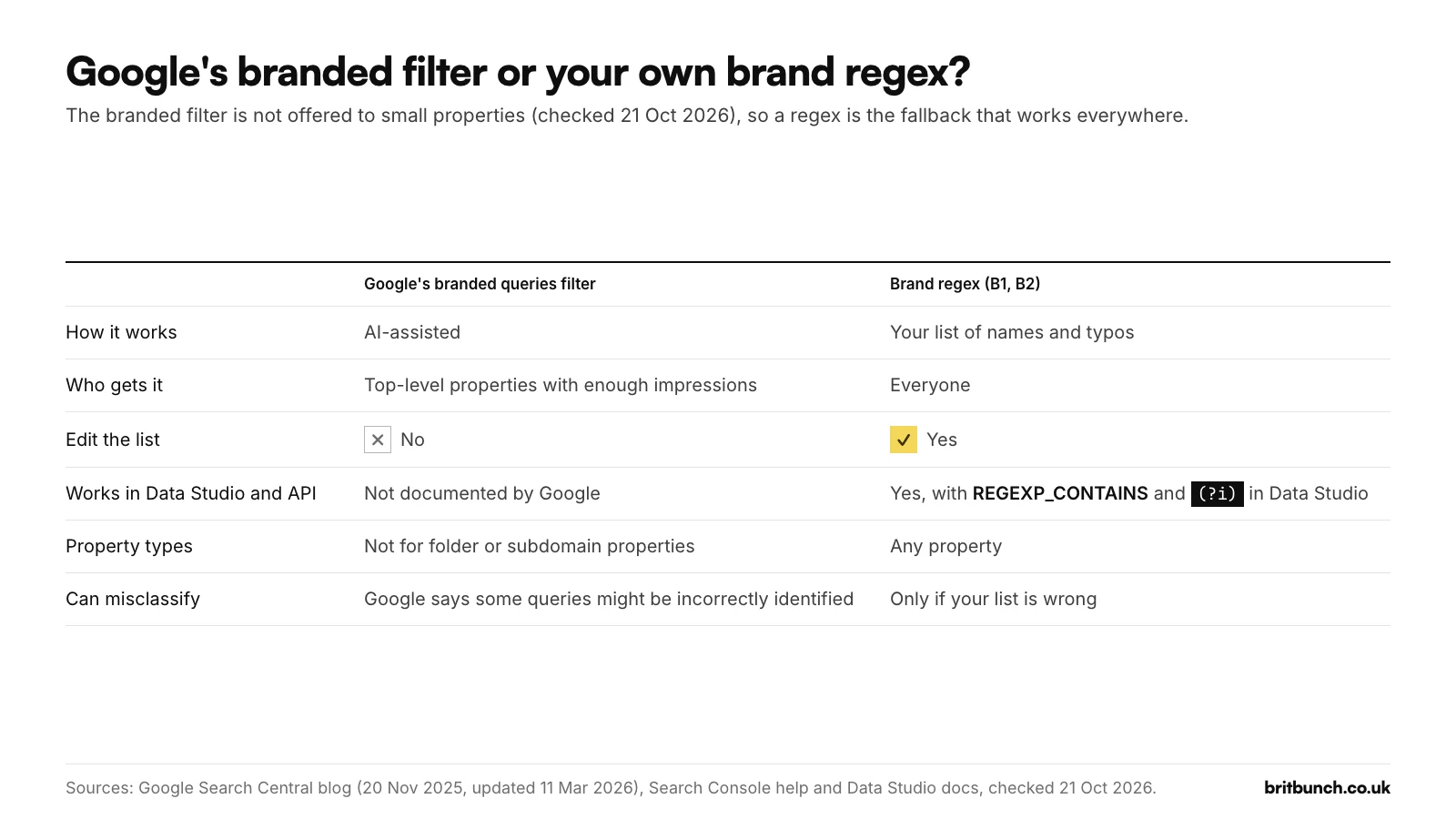
So which should you use?
- If the branded filter shows in your property, use it for a quick read, and keep a brand regex alongside it so you can see exactly which searches are counted.
- If it does not show, or you have a folder or subdomain property, use the regex below.
- If you report in Data Studio, Google does not document the branded filter there, so use the regex (see the Data Studio section).
The brand regex: names, typos, spaces and hyphens
The idea is as old as the filter. When Google launched regex filters on 7 April 2021, its example was a brand pattern: cats and dogs|cats & dogs|c&d. In June 2021 it used another, willow tree|wilow tree|willowtree|willowtee: the name, a typo, the name without a space, and a typo of that. Each version sits between | signs, which mean "or", with no spaces around them.
Here is B1 from our library of 50 filters, written for Anytown Plumbing, the invented Kent firm whose example export runs through this series:
\b(anytown[ -]?plumbing|any ?town ?plumbing|anytown ?plumbers|anytown ?heating)\b
What each part does:
\bat each end means "whole word only", so the pattern does not fire inside a longer word.anytown[ -]?plumbingcovers anytown plumbing, anytownplumbing and anytown-plumbing, because[ -]?means "a space or a hyphen, or nothing".any ?town ?plumbingcatches the name typed as two words, with or without spaces.anytown ?plumbersandanytown ?heatingare the other names people use for the same firm.
It matches "anytown plumbing reviews", "any town plumbing rochester" and "anytown-plumbing boiler service", and it ignores "anytime plumbing medway" and "any plumber in town" (Example data). Test B1 in our free tester before you paste it.
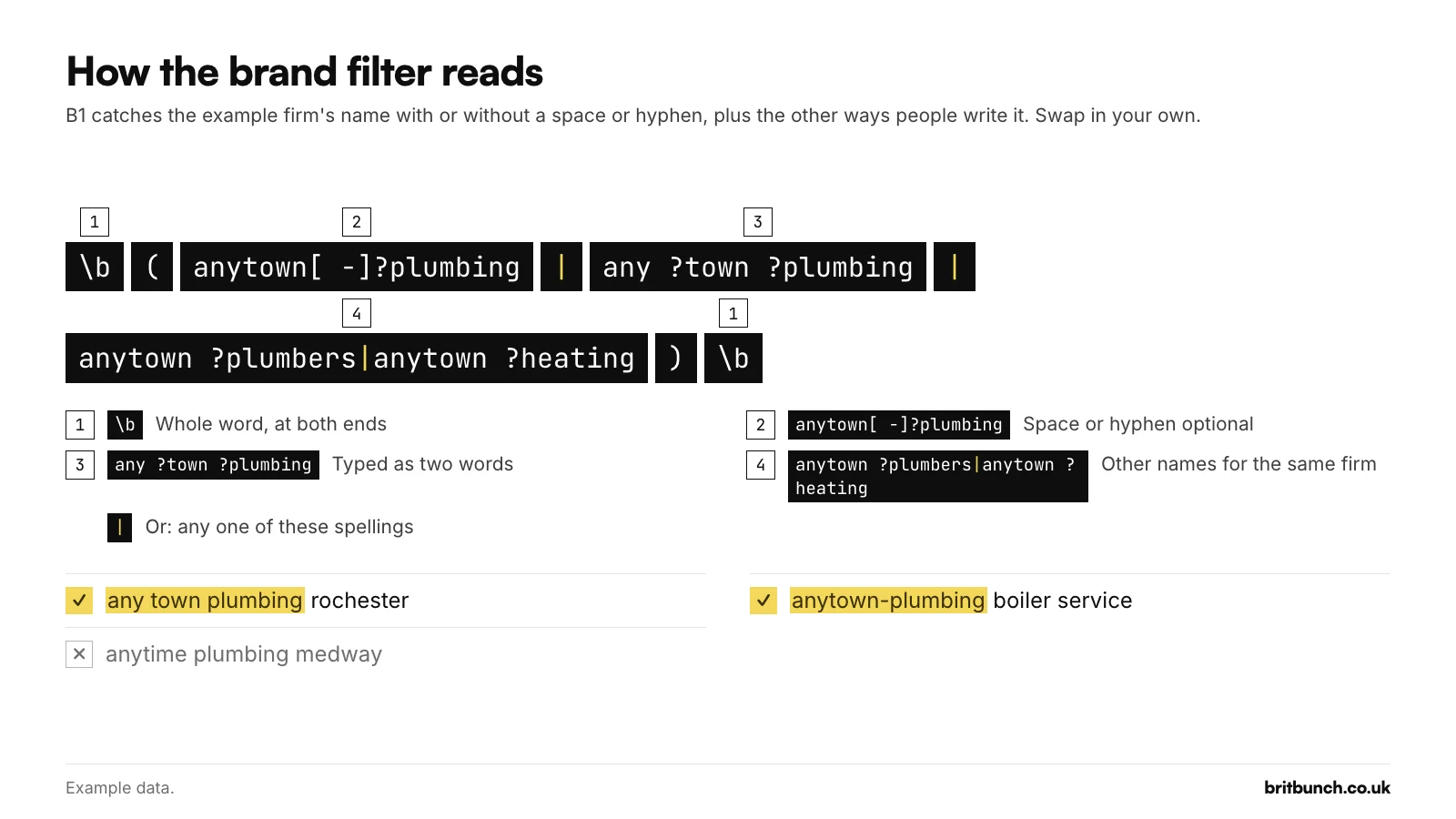
To make your own, swap in your name and the ways people actually mistype it. Add the names of products or services that only you sell, because Google's own filter counts those as brand searches too. Leave out your town and your trade: "plumber gravesend" is the non-brand search you want to grow.
To apply it, open the Performance report and choose + Add filter, then Query. Pick Custom (regex) in the first dropdown and Matches regex in the second, paste the pattern into the box labelled "Enter regular expression (regex)" and press Apply.
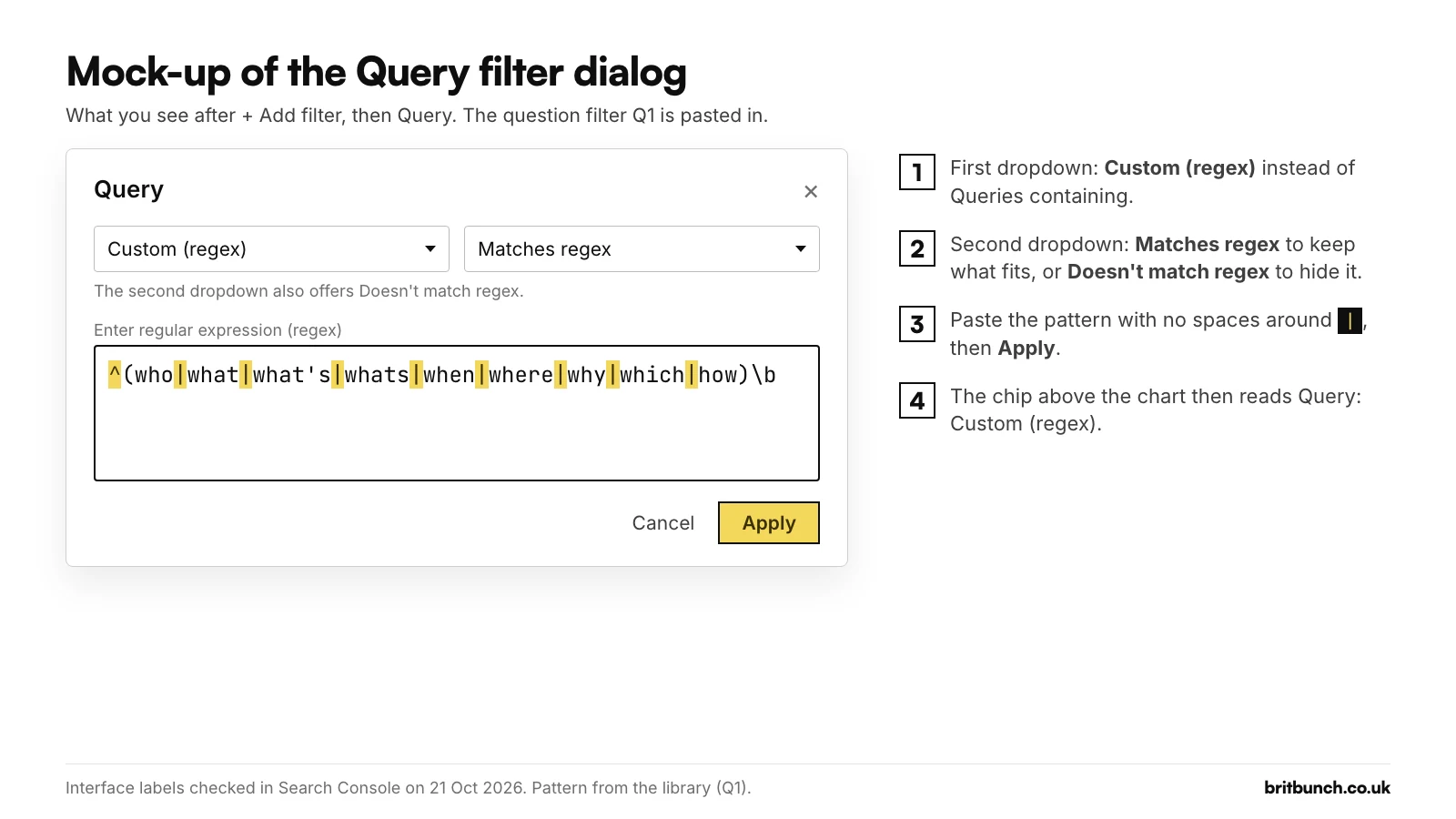
Non-brand searches with Doesn't match regex
For non-brand searches, use exactly the same pattern and change the second dropdown to Doesn't match regex, an option Google added on 2 June 2021. In our library this is B2:
\b(anytown[ -]?plumbing|any ?town ?plumbing|anytown ?plumbers|anytown ?heating)\b
It hides every search that contains your brand and shows the rest. Track its clicks and impressions month on month, because this is the number SEO work should move. Test B2 in the tester.
Do not try to do this with a single pattern that means "not my brand". Patterns seen in popular guides use a "lookahead" to exclude words, which starts with (?!, and Search Console's engine does not support it. When we tried an unsupported lookahead in a live Search Console property on 21 October 2026, the box accepted it with no warning, and the report showed 0 clicks, 0 impressions and no data. There was no error message, just an empty report that looks as if nobody searched.
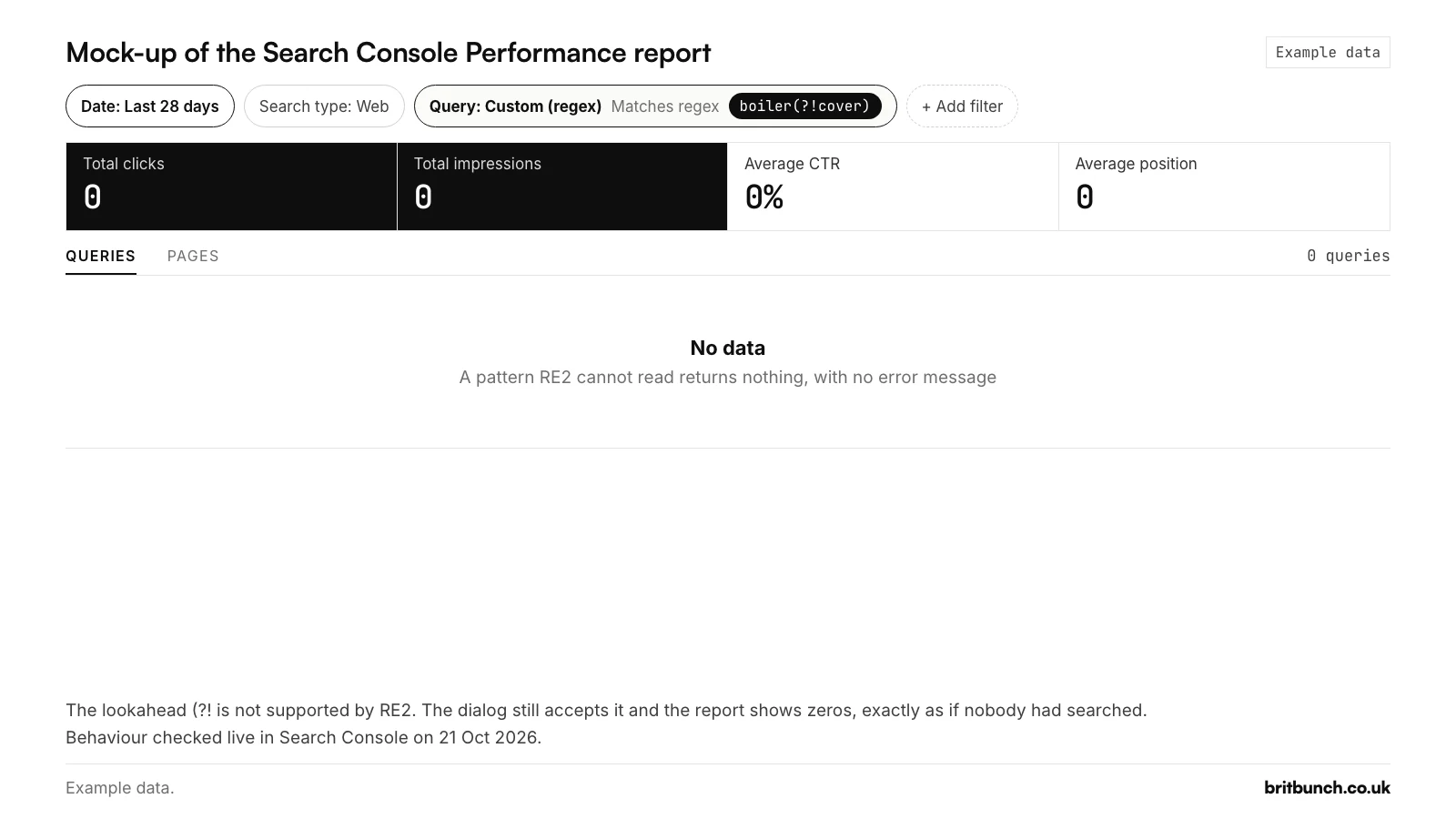
boiler(?!cover) applied as a Query filter. An unsupported pattern fails silently and looks like zero searches. Behaviour checked live on 21 October 2026. Example data.We checked one more thing that day. Search Console allows one Query filter at a time: choosing Query again reopens the filter you already have. So you cannot stack "not my brand" on top of, say, a question filter. You can combine it with a Page filter, for example to see non-brand searches for your blog posts only (P1 in the library).
Why brand and non-brand do not add up to the total
Some searches are made by so few people that Google never shows them. Google calls these anonymised queries: searches not made by more than a few dozen people over two to three months. They are counted in the chart totals, but they drop out as soon as you apply a query filter (Google Search Central, 19 October 2022).
Google's own example: a filter for searches containing "fiction" showed 175 clicks, the opposite filter showed 275, and together they made 450. The unfiltered chart said 550. The missing 100 came from anonymised queries, which neither filter can see.
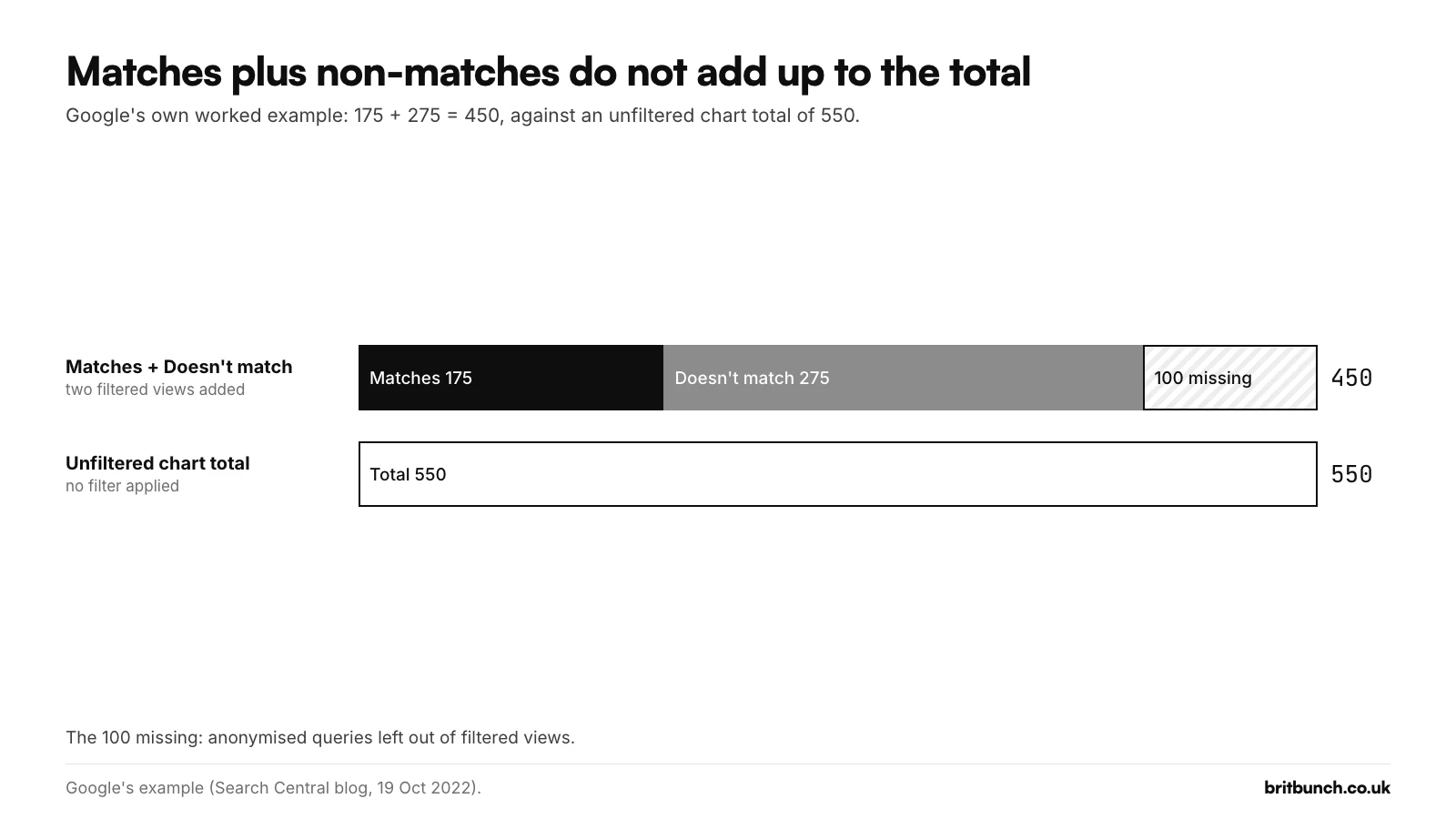
Search Console reminds you of this whenever a filter is on, with a note under the totals: "Chart totals and table results might be partial when filters are applied." Google's help also says filtering can change the totals because of data truncation, not only because of anonymised queries.
In practice:
- Compare brand with brand, and non-brand with non-brand, over time. Do not subtract one from the total to get the other.
- If you want a brand share, divide brand by brand plus non-brand, not by the total, and say so in your report.
Example data: 1 in 100 impressions, 3 in 10 clicks
Example data: Anytown Plumbing (example.co.uk), an invented plumbing and heating firm in Medway, Kent, 28 days, Search type Web. The export is made up to show how the filters behave; nothing in it comes from a real property.
The whole report shows 152 clicks and 19,400 impressions. The 180 searches Search Console lists carry 134 of the clicks and 15,825 of the impressions; the rest sit in searches Google does not list.
B1 finds 14 of those 180 searches, with 125 impressions (0.8% of the visible total) at an average position of 1.1. Those 14 rows carry 41 clicks: 3 in every 10 clicks the site can see come from people who already knew its name. B2, the same pattern set to Doesn't match regex, keeps the other 166 searches, 15,700 impressions and 93 clicks. That second figure is the one SEO work should move. Read the whole report alone and a quiet month for SEO can hide behind a busy month for word of mouth.
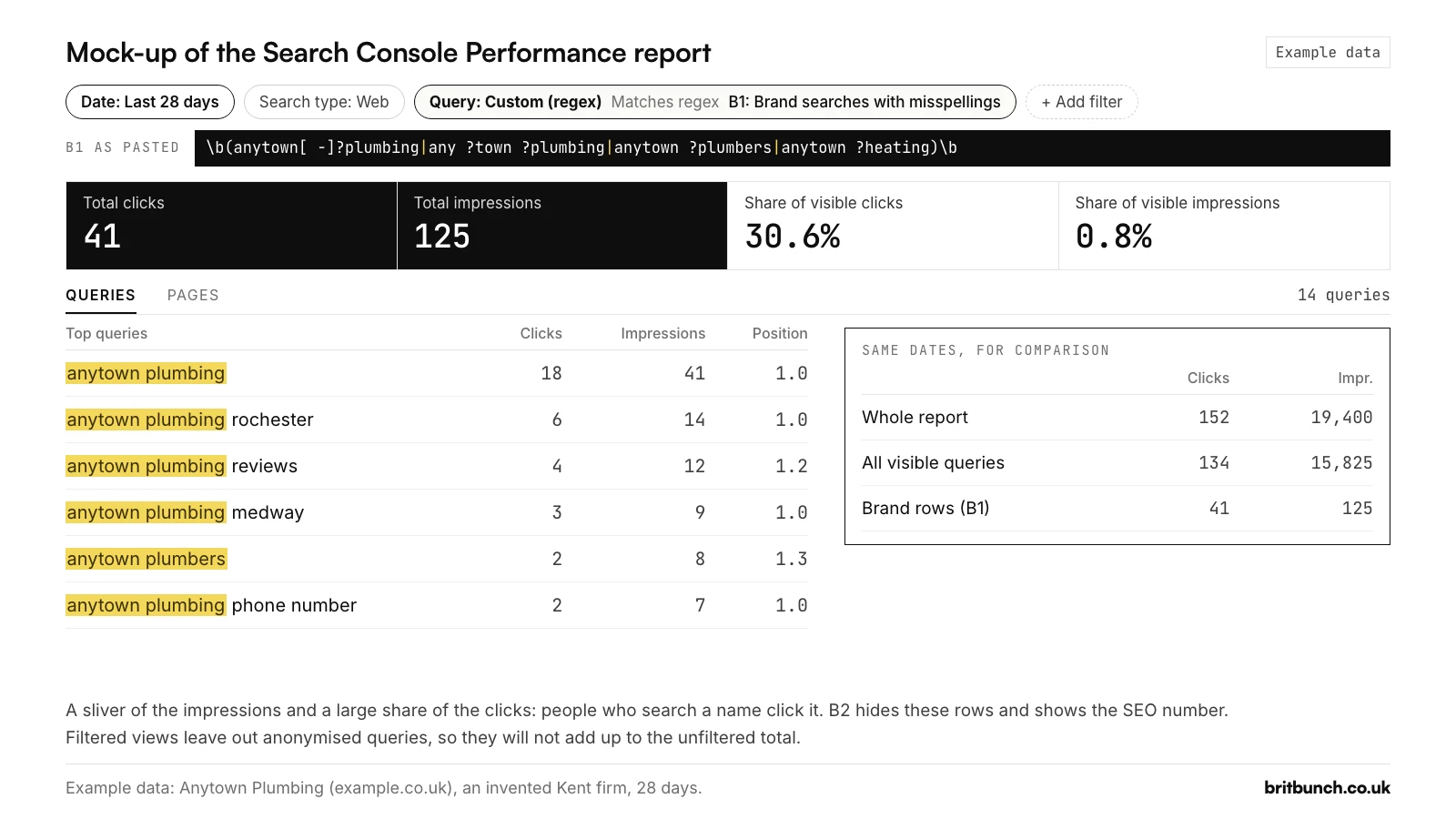
On a newer or smaller site the brand view is often empty, and an empty brand view can mean three different things:
- Nobody searched for your name.
- People did, but too few of them for Google to list the searches.
- Your pattern is broken. As shown above, Search Console gives the same empty report for a pattern it cannot read.
On a small site, the second is a real possibility. Test the pattern first, then keep the brand view and look at it each month. A search that no more than a few dozen people make over two to three months stays anonymised, so it never gets its own row.
Reputation checks (B3)
Brand searches that include words like "reviews" or "scam" tell you what people want to check before they buy from you. B3 finds them, in either order:
\b(anytown[ -]?plumbing)\b.*\b(reviews?|complaints?|scam|legit|trustpilot|any good)\b|\b(reviews?|complaints?|scam|legit|trustpilot)\b.*\b(anytown[ -]?plumbing)\b
It shows searches that combine the brand with reviews, complaints, scam, legit or Trustpilot, so "is anytown plumbing legit" and "reviews of anytown plumbing" count, while "anytown plumbing contact" and "boiler service reviews medway" do not (Example data). The pattern is written twice, once with the brand first and once with it second, joined by |, because without lookaheads this is how RE2 says "both words, in any order". Test B3 in the tester.
On the example data it finds 2 of 180 searches, "anytown plumbing reviews" and "is anytown plumbing any good", with 4 clicks between them (Example data). If it finds rows on yours, make sure your reviews and your Google Business Profile answer those searches well. Our guide to getting more Google reviews covers the honest way to build them.
Brand regex in Data Studio
If you report in Data Studio (Google renamed Looker Studio back to Data Studio in April 2026), the same pattern works with two changes:
- Add
(?i). Data Studio's regular expressions are case-sensitive by default, so without it "Anytown" and "anytown" are different searches. - Use REGEXP_CONTAINS, not REGEXP_MATCH. REGEXP_MATCH only counts a row if the whole value matches the pattern. REGEXP_CONTAINS matches anywhere in the text, like Search Console.
A calculated field that labels every query as brand or non-brand:
CASE
  WHEN REGEXP_CONTAINS(Query, R"(?i)\b(anytown[ -]?plumbing|any ?town ?plumbing|anytown ?plumbers|anytown ?heating)\b") THEN "Brand"
  ELSE "Non-brand"
END
The R before the quotes makes it a raw string, so Data Studio reads the backslashes exactly as written (Data Studio Help). Swap Query for your own query field's name if it is different, then use the new field as a dimension or a filter.
Mistakes that make brand numbers wrong
- A name that is too short. On the example data, a loose
anymatches 17 searches, because "company" contains it: "plumbing company rochester kent" and "local plumbing company" would be counted as brand (Example data). Use the full name with\bon each side. - Wildcard typos. Patterns seen in popular guides use shortcuts such as
f*book.*to catch a brand's typos.f*means "zero or more f's" and matching is partial, so that matches any search containing "book", including "book a table", andfb.*matches "fbi jobs" (Example data, tested in RE2 on 21 October 2026). List the real typos instead. - A minus sign to exclude. Patterns seen in popular guides also suggest
-.*yourbrand.*to hide a brand. Regex has no minus for "not": that pattern looks for a hyphen somewhere before your brand. Use Doesn't match regex. - Spaces around
|. Spaces count as characters. In a live check on 21 October 2026, a pattern for two searches found both rows when written without spaces around the|, and nothing with them. - Reading the gap as a fault. Brand plus non-brand will fall short of the total. That is anonymised queries, not a broken filter.
Our troubleshooting guide covers these and other fixes, and the main regex guide explains the rules from the start.
Free: build your brand filter in a minute
The Search Console regex tester has a brand-variant builder. Type your business name, tick the spacing, hyphen and typo variants you want, and it builds the brand (Matches) and non-brand (Doesn't match) versions for you to test before you paste.
Want the whole set? Download all 50 tested filters as a CSV library or a PDF cheat sheet, or drop your Search Console export into the query sorter to split it into brand, local, question and other groups.
Want a hand with it?
None of this needs to be done in one sitting. Set up the brand and non-brand views once, check them each month, and look at the trend rather than any single number. If you would rather have someone set up these views and explain what they say about your business, take a look at our SEO service.