
If your Search Console regex filter is not working, the cause is usually one of the nine things covered below, such as a lookahead, spaces around |, a page pattern that starts with ^/ or a missing \b. Search Console will not tell you which. When we tested a pattern its engine cannot read in a live property, it was accepted without a warning and the report came back empty, exactly as if nobody had searched.
Search Console behaviour last checked 21 October 2026. The figures in this guide are example data for Anytown Plumbing, an invented Kent firm, not from any real property.
Three rules from Google's Advanced filtering and comparison help decide whether a pattern works, and every fix below comes back to one of them:
- RE2. "The RE2 syntax is used." RE2 is Google's regex engine, and it leaves out some features other regex tools have, such as lookaheads.
- Partial match. A pattern can match anywhere in the search or the page address unless you add
^(starts with) or$(ends with). - Not case-sensitive. "Default regex matching is not case-sensitive." Add
(?-i)only when capitals matter.
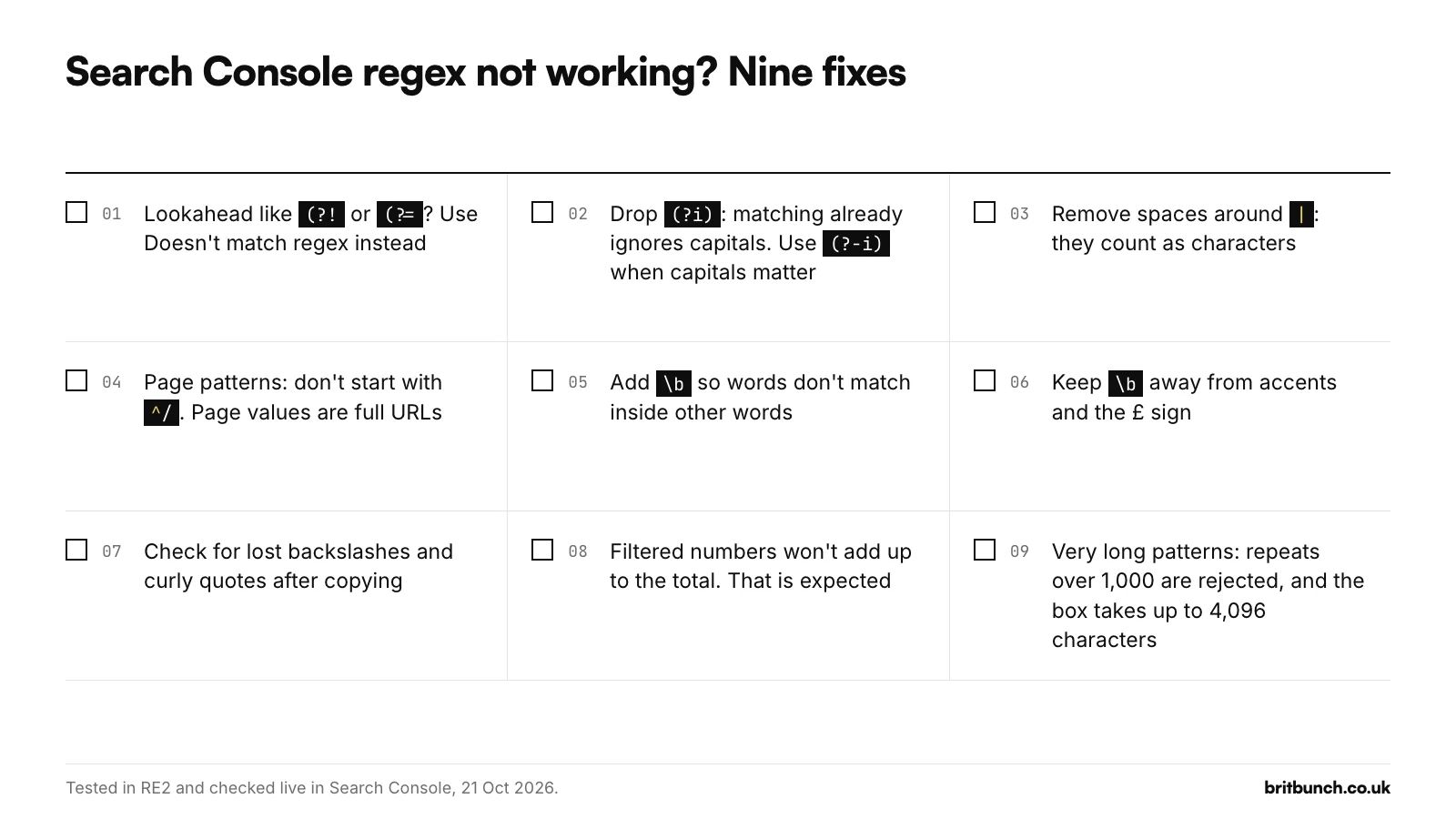
First, a broken pattern looks like zero searches
On 21 October 2026 we pasted a lookahead pattern, of the shape boiler(?!cover) ("boiler, but not followed by cover"), into the Query filter of a live Search Console property. RE2 does not support lookaheads. The dialog accepted it with no warning and the Apply button stayed active. After Apply, the report showed 0 clicks, 0 impressions and no rows, with no error message anywhere. The only note on the page was "Chart totals and table results might be partial when filters are applied", which Search Console shows with any filter.
From 2021 until spring 2026, Google's help said "Invalid regular expression syntax will return no matches" (archived copy, March 2026). That line has gone from the current help page, but in our test an invalid pattern still returned nothing. So when a filter returns nothing, ask whether the pattern is valid before you decide nobody searched for it. Our free regex tester checks this before you paste.
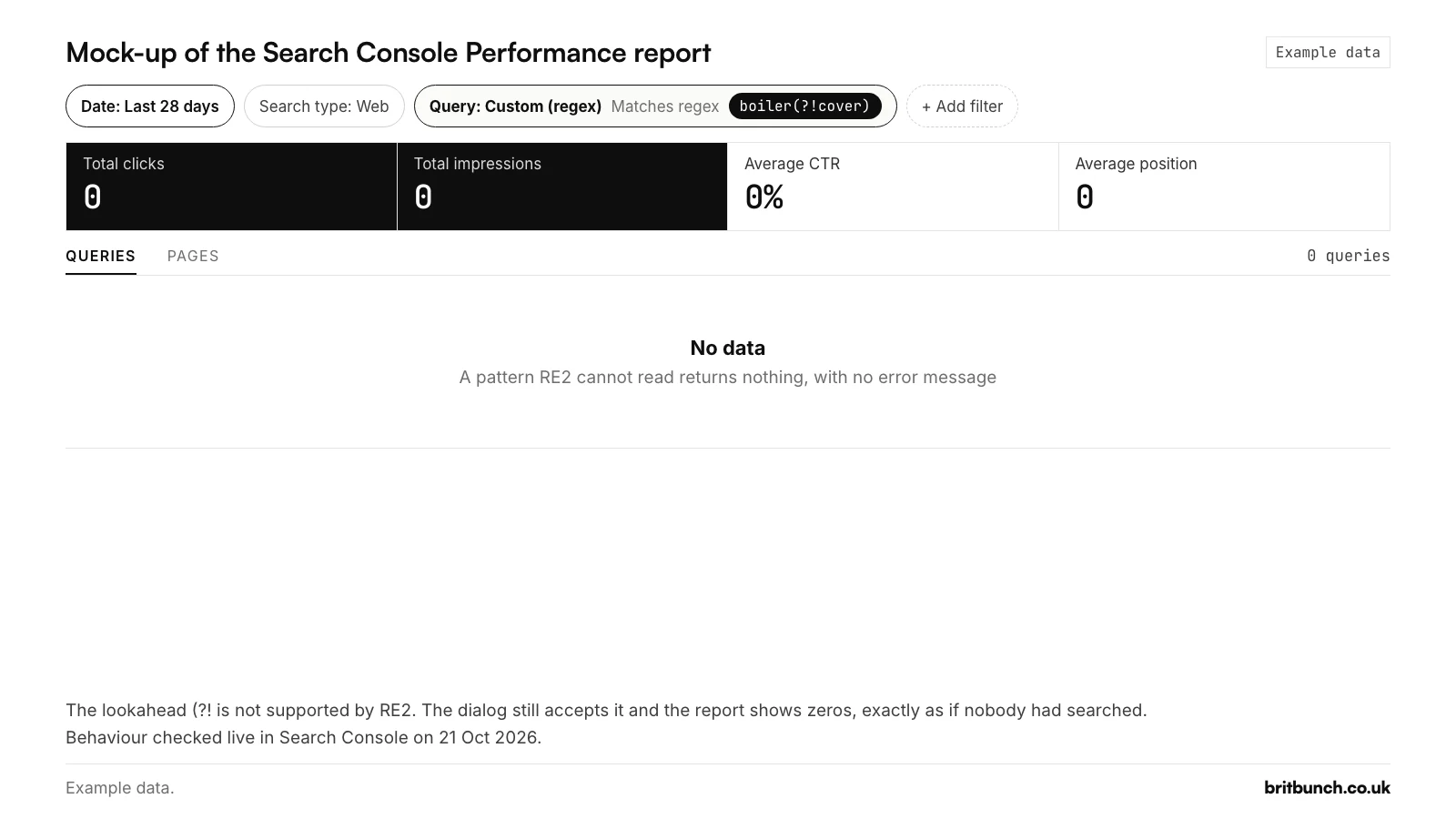
boiler(?!cover) applied as a Query filter. An unsupported pattern fails silently and looks like zero searches. Behaviour checked live on 21 October 2026. Example data.1. You used a lookahead
RE2 does not support lookahead or lookbehind ((?=, (?!, (?<=, (?<!), backreferences such as \1, or possessive repeats such as ++. Google's RE2 syntax page marks them "NOT SUPPORTED", and every one failed when we tested it in RE2.
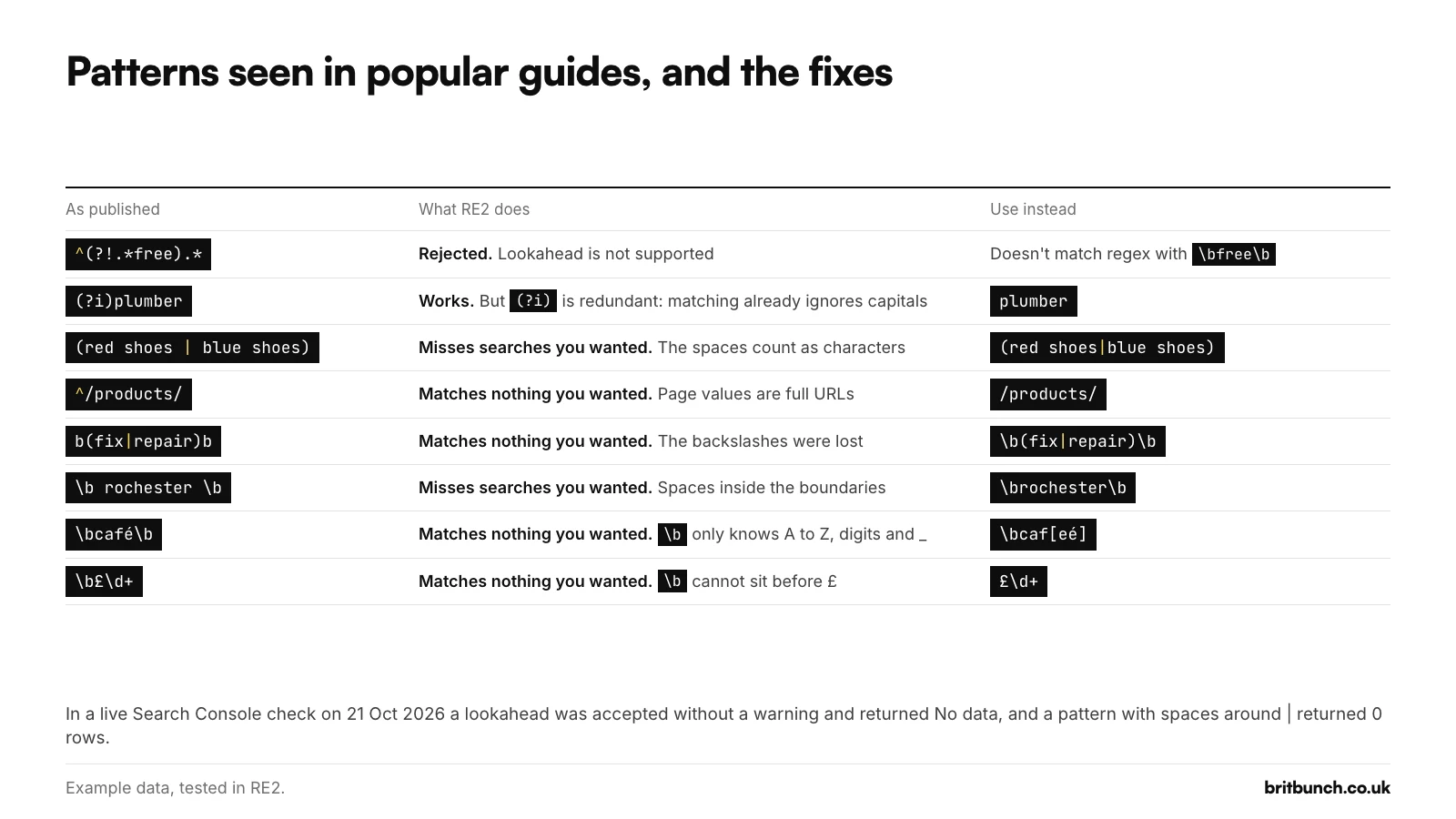
Patterns seen in popular guides use them anyway. ^(?!.*free).* is offered as a way to hide searches containing "free", and (?=.*google)(?=.*analytics).* as a way to find searches containing both words. Another guide suggests (?!)SOCIAL for handling capitals, which is also a lookahead. RE2 rejects all three.
There are two ways round it:
- To exclude a word, choose Doesn't match regex in the second dropdown and paste a pattern for the word itself, for example
\bfree\b. Search Console has offered "Doesn't match regex" since 2 June 2021. - To require two words, write "A then B, or B then A":
google.*analytics|analytics.*google. Our library's local filter G3 uses the same shape for a service and a town in either order (test G3).
You cannot fix it by adding a second Query filter. When we tried, with a Query regex already applied, Add filter > Query reopened the existing Query filter for editing. One Query filter at a time is the rule, although a Query filter and a Page filter can be combined. If you need "contains A but not B", export the data and use our query sorter: put a bucket for B above a bucket for A, and because the first match wins, rows containing B never reach A.
2. Your guide says Search Console is case-sensitive
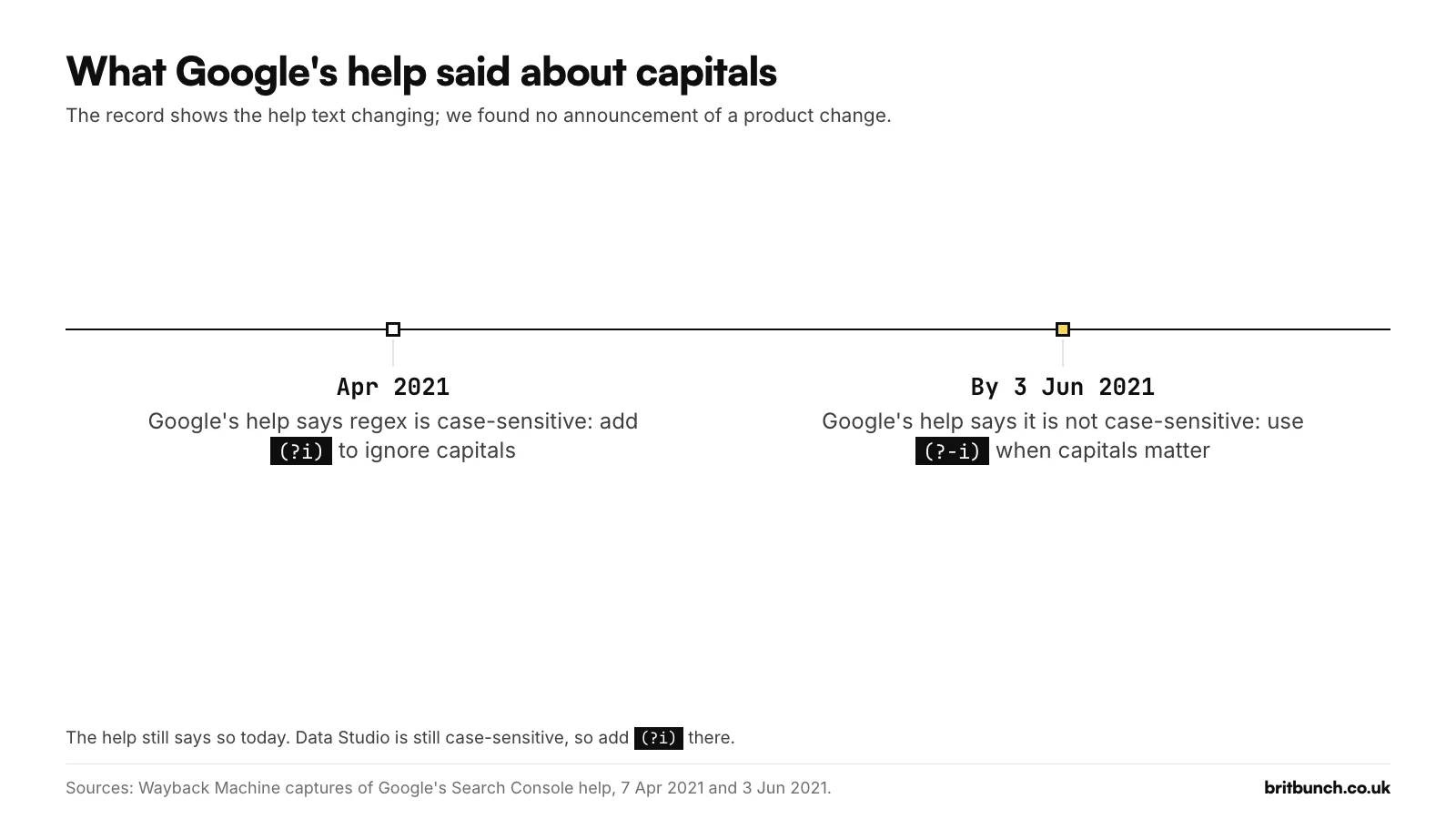
It is not, and it has not been for most of the filter's life. When regex filters launched on 7 April 2021, Google's help said "Default matching is case-sensitive" and suggested adding (?i) (archived help, April 2021). Between the 26 May and 3 June 2021 copies of the page in the Web Archive, the help changed to "Default regex matching is not case-sensitive", and it says the same today (archived help, June 2021).
Guides updated in September and October 2026 still tell you to add (?i), and one knowledge base still says "Regular expressions are case-sensitive by default." (?i) does no harm in Search Console: (?i)plumber and plumber both match "Plumber Gravesend". It is simply not needed.
The setting you may need is the opposite one. (?-i) makes the rest of the pattern case-sensitive. Google's own example is that (?-i)AAA will match https://example.com/AAA, which is useful for page addresses that mix capitals. It only affects what comes after it in the pattern.
If you reuse a pattern in Data Studio (the name Looker Studio went back to in April 2026), the rules flip. Its text comparisons are case-sensitive, and REGEXP_MATCH must match the whole value, so use REGEXP_CONTAINS and add (?i) there (Google's REGEXP_CONTAINS reference).
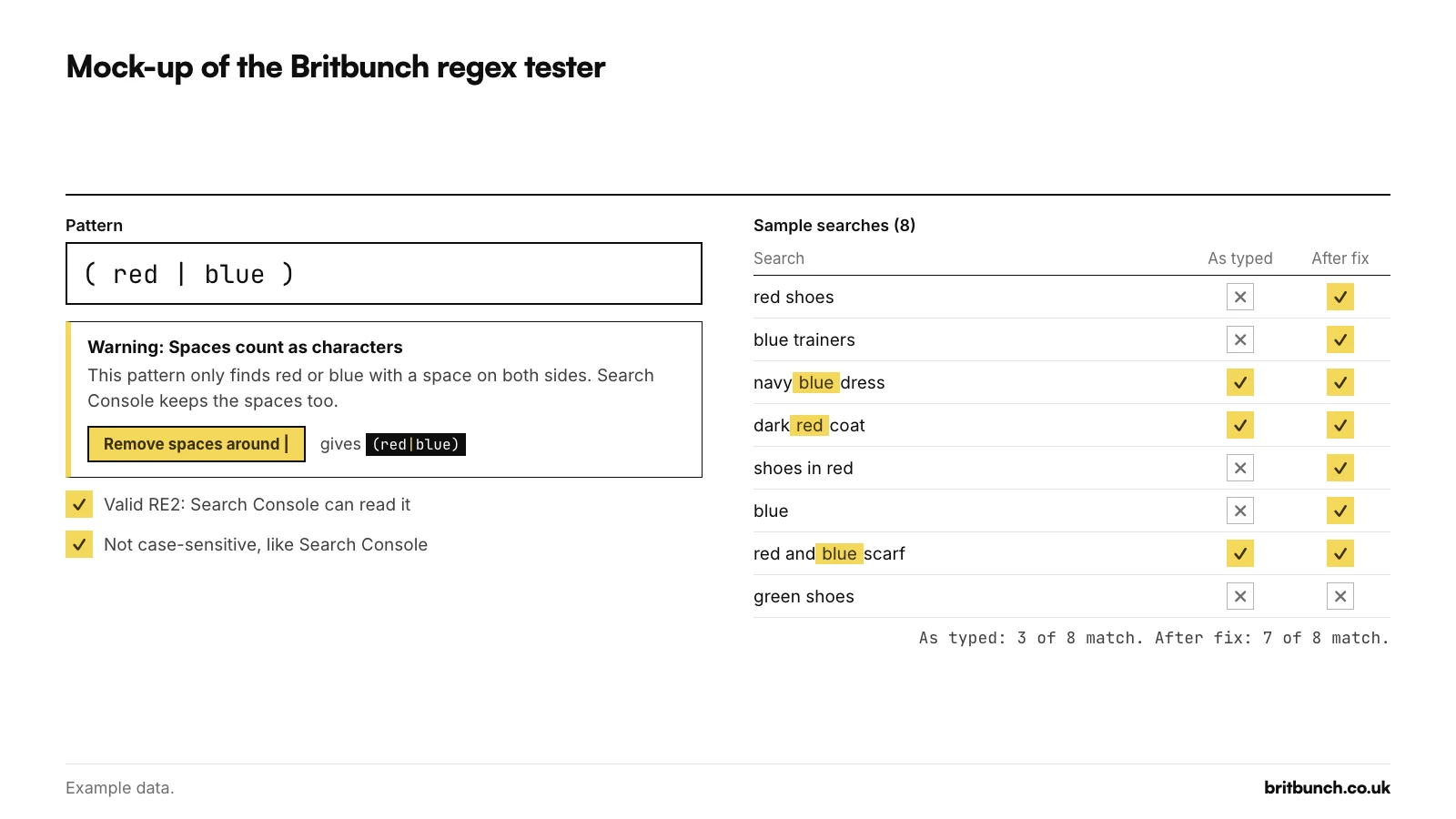
3. You put spaces around the |
Google's help tells you to separate several values with a vertical bar and surround the whole expression with parentheses, and its template shows a space either side of each bar. RE2 treats a space as a character to find, so each space becomes part of the option next to it. One of Google's own examples from before the 2026 rewrite, (the world cup | world cup | 2022 world cup), matches none of "world cup", "the world cup" or "2022 world cup" when pasted as written (archived help, April 2026).
We checked live, on 21 October 2026, whether Search Console quietly removes the spaces. It does not: a two-search pattern returned both rows without spaces and nothing with them. On the example data the same pattern looks like this:
| Rows | Impressions | Pattern |
|---|---|---|
| 2 | 290 | (boiler service rochester|emergency plumber chatham) |
| 0 | 0 | (boiler service rochester | emergency plumber chatham) |
Example data: Anytown Plumbing, an invented Kent firm, 28 days. The behaviour was checked live; the figures come from the example export. Filtered views leave out anonymised queries, so they will not add up to the unfiltered total.
The spaced version can look as if it half works, because it still matches when another word sits next to the phrase: (red shoes | blue shoes) misses "red shoes" but catches "buy red shoes online". Spaces inside word boundaries cause the same trouble. A local pattern seen in popular guides puts a space between each \b and the town name. With a Kent town in it, \b rochester \b misses "plumber rochester" and only matches when the town sits in the middle of a search. Write \brochester\b.
The fix: no spaces either side of |, and a space inside an option only where the search itself has one.
4. Your page pattern starts with ^/
Page values in Search Console are full addresses, starting with https:// and the domain. A pattern that starts ^/ asks for an address that begins with a slash, and none do. In a live check on 21 October 2026, ^/blog/ returned no data while /blog/ returned rows. On the example site, /blog/ returns 8 pages, 9,060 impressions and 35 clicks (Example data). A pattern seen in popular guides, ^/products/[a-z0-9-]+, is presented as working in Search Console and Google Analytics; in Search Console it can never match.
Either drop the ^, or anchor on the full address. Blog posts only (library filter P1, test it):
/blog/.+
Homepage only (P3, test it). Swap in your own domain and keep the backslash before each dot:
^https?://(www\.)?example\.co\.uk/?$
Two more things to know. Search Console reports the final address after any redirects and assigns most data to the page's canonical URL, so a valid pattern aimed at tracking parameters or duplicate addresses can still return nothing. Page regex also works in the Generative AI features report, which we confirmed on 21 October 2026 by applying a Page filter there.
5. A missing \b matches inside other words
Because matching is partial, a short word matches inside longer ones. On the example data, a filter for people wanting to hire, written as plain hire, matches two searches: "hire a plumber for a day" and "sapphire bathroom taps" (Example data). With \bhire\b, only the first is left. \b means "the edge of a word", so the word has to stand on its own.
Google's own 2021 examples have the same problem: what|how|when|why matches "somehow" and "show", and buy|purchase|order matches "border collie" (Search Central blog, June 2021). Brand patterns seen in popular guides go wrong the same way: fb.* matches "fbi jobs" and f*book.* matches any search containing "book".
The fix is to wrap the list in \b( and )\b. Our hire filter (I3, test it):
\b(agency|agencies|company|companies|consultant|consultancy|freelancer|specialist|expert|hire|services?)\b
Our question filter (Q1, test it) puts \b after the question word, so "however" and "whatsapp" do not count:
^(who|what|what's|whats|when|where|why|which|how)\b
Town names need the same care, plus a rule for towns that are also everyday words. Our Kent filter (G2, test it) only counts Deal, Sandwich, Hythe and Rainham when "kent" follows, so "best deal on boilers" stays out. Swap in your own towns; our local SEO regex guide explains the choices.
\b(kent|gravesend|northfleet|dartford|swanscombe|greenhithe|ebbsfleet|maidstone|medway|rochester|chatham|gillingham|strood|sittingbourne|faversham|sheerness|canterbury|whitstable|herne bay|margate|ramsgate|broadstairs|dover|folkestone|ashford|tenterden|tonbridge|tunbridge wells|sevenoaks|swanley|westerham|edenbridge|west malling|snodland|aylesford|cranbrook|paddock wood|bluewater)\b|\b(deal|sandwich|hythe|rainham),? kent\b
6. You put an accent or £ next to \b
\b only understands plain A to Z letters, digits and the underscore: RE2's syntax page describes it as an ASCII word boundary. Next to an accented letter or a £ sign it stops working. In our RE2 tests, \bcafé\b missed "café near me" and \b£\d+ missed "haircut £20". A Spanish question pattern in a popular guide failed for the same reason: it ended in \b, so it missed "qué es seo".
The fixes are small:
- For accents, put both spellings in brackets and leave the closing
\boff:\bcaf[eé]matches "cafe" and "café" (and "cafeteria", so check your results). - For prices, keep the £ outside any
\b:£\d+matches "haircut £20".
Our price filter (I1, test it) ends with |£ outside the brackets for this reason:
\b(price|prices|pricing|cost|costs|how much|fee|fees|cheap|cheapest|affordable|budget|quote|quotes)\b|£
7. Backslashes or quotes changed when you copied
Some guides publish patterns whose backslashes were lost in the page's code, so \b(...)\b appears as b(...)b. Pasted as it stands, b(fix|repair)b looks for "bfixb" or "brepairb" and matches nothing you wanted. Word processors, email and some website editors also swap straight quotes for curly ones: a pattern containing what’s with a curly apostrophe does not match the search "what's" typed with a straight one.
An "AI prompt" regex seen in popular guides has curly quotes inside its brackets, and in our RE2 test it simply picks out searches of 11 or more words. It measures length, not AI (our guide to questions and long searches explains what Search Console can tell you about AI-style searches). If length is what you want, say so. L2 shows searches of five or more words (test it):
^\S+(\s+\S+){4,}$
One guide also suggests a leading minus, -.*yourbrand.*, to exclude a brand. Regex has no minus operator: that pattern looks for a hyphen followed by your brand. Use Doesn't match regex with a brand pattern instead, as in our brand versus non-brand guide.
The fix for all of these: copy from a source that shows the code as plain text (every code block on this page has a Copy button), paste into a plain-text editor first, and check every \ survived.
8. Your numbers do not add up
Sometimes the filter works and the totals still look wrong. Google keeps rare searches private: anonymised queries are ones not "issued by more than a few dozen users over a two-to-three month period" (Search Central blog), and they count in chart totals "unless a query filter is applied" (Google's help). So "matches" plus "doesn't match" may not add up to the unfiltered total, the table shows at most 1,000 rows, and Search Console itself warns that "Chart totals and table results might be partial when filters are applied." On the example data, the report shows 152 clicks over 28 days, yet the searches it lists carry 134 between them; the other 18 belong to searches too rare to be shown (Example data: Anytown Plumbing). Our Search Console regex guide explains where the missing clicks go.
9. Your pattern is very long
The character limit for the regex box in Search Console is 4,096: we read it from the box itself on 21 October 2026. Google documents the same 4,096-character limit for each filter in the Search Console API, but not for the box. A longer pattern will not all fit, so check the end of a long list survived the paste. If the cut lands inside a bracket, the pattern becomes invalid, and as our test above showed, an invalid pattern can look like zero searches.
RE2 also rejects any counted repeat above 1,000, such as {1001} (RE2 syntax).
Because you cannot add a second Query filter to carry the overflow, split a very long list into two patterns and run each as its own view. Most patterns need nowhere near the limit: our Kent towns filter above is 426 characters.
How to test a pattern safely
Search Console will not tell you a pattern is broken, so test it before you paste it.
- Our free tester. The Search Console regex tester uses an RE2 engine in your browser, warns about the problems on this page before it runs a pattern (lookaheads, spaces around
|,^/on page patterns,\bnext to accents or £, curly quotes, length), and highlights the part of each line that matched. - regex101, set to Golang. regex101 has no RE2 option, whatever one guide says about choosing an "RE2 flavor". The closest is its Golang flavour, because Go's regexp package uses RE2 syntax. Golang there is case-sensitive, so tick the i flag to match Search Console.
- Not a JavaScript tester. A tester that uses JavaScript's own regex engine behaves differently: in our tests it accepted lookaheads and huge repeat counts that Search Console rejects, and rejected
(?i)and(?-i). - Your own data, not five made-up lines. Sample lists are hand-picked. One published "minimum five words" pattern also matched four-word searches when we tested it. Our query sorter runs patterns over your whole Search Console export, and our library of 50 filters lists sample matches and non-matches for each one.
Once a pattern works, bookmark the report. Search Console keeps the filter in the page address (in coded form, as query=~ followed by your pattern), so the bookmark brings the filtered view back.
What Google changed in 2021 and 2026
Several of the problems above come from advice written for an older Search Console:
- 7 April 2021: regex filters launch. Google's help says matching is case-sensitive.
- 2 June 2021: "Doesn't match regex" arrives.
- By 3 June 2021: the help says matching is not case-sensitive, as it does today.
- 2021 to early 2026: the help says invalid patterns "will return no matches" and links regex101 for testing.
- Between 7 April and 10 May 2026: the regex help moves to a new page, Advanced filtering and comparison. The old address no longer covers regex, the button now reads "+ Add filter", and the invalid-pattern line and the regex101 link are gone.
The full timeline, including Google's newer branded filter and AI features, is in our Search Console regex guide.
Free: test before you paste
Paste any pattern into our Search Console regex tester. Its lint mode flags lookaheads, stray spaces, ^/ page patterns, accents next to \b and curly quotes before you go near Search Console, and it shows which part of each line matched.
If the filter works but the numbers still worry you
A regex filter only sorts the data. It cannot tell you why a number moved. If a working filter shows a fall, our guide to why website traffic drops sets out what to check, in order. If the searches you care about sit on page 5 or deeper, see why a website isn't ranking on Google.
If you would rather go through your Search Console with someone, that is part of our SEO service.