
Search Console behaviour last checked 21 October 2026. The figures in this guide are example data for Anytown Plumbing, an invented Kent firm, not from any real property.
The regex filter in Google Search Console lets you filter the Performance report with a pattern instead of a single word. One filter can show every question people asked, every search naming your town, or everything except your brand. It sits under + Add filter, then Query or Page, then Custom (regex), and it is available on small sites as well as large ones.
Three rules decide whether a pattern works:
- It uses RE2, Google's regex syntax, which has no lookaheads or lookbehinds.
- It matches part of the text. A pattern counts if it appears anywhere in the search, unless you pin it with
^(starts with) or$(ends with). - Capitals are ignored. "SEO" and "seo" are the same unless you add
(?-i).
What the regex filter does
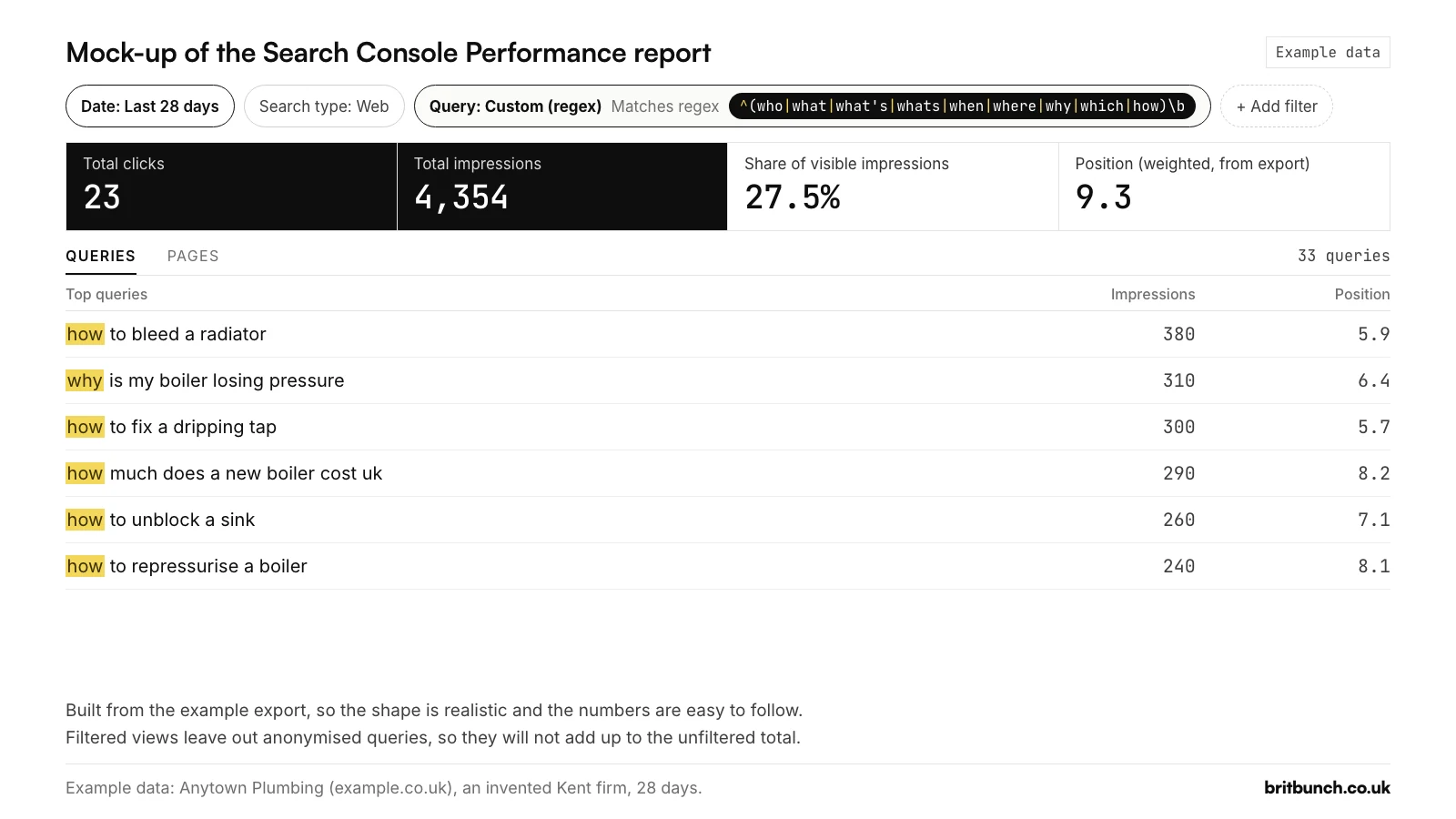
An ordinary filter looks for one piece of text. A regular expression (regex) is a short pattern, such as "starts with a question word" or "mentions any of these towns", and the report then shows only the searches or pages that fit. Here is a mock-up of the report with the question filter from this guide applied. The figures come from an example export we built for Anytown Plumbing, an invented plumbing and heating firm in Medway, Kent; every number in this series is example data, not from a real property.
Where to find it
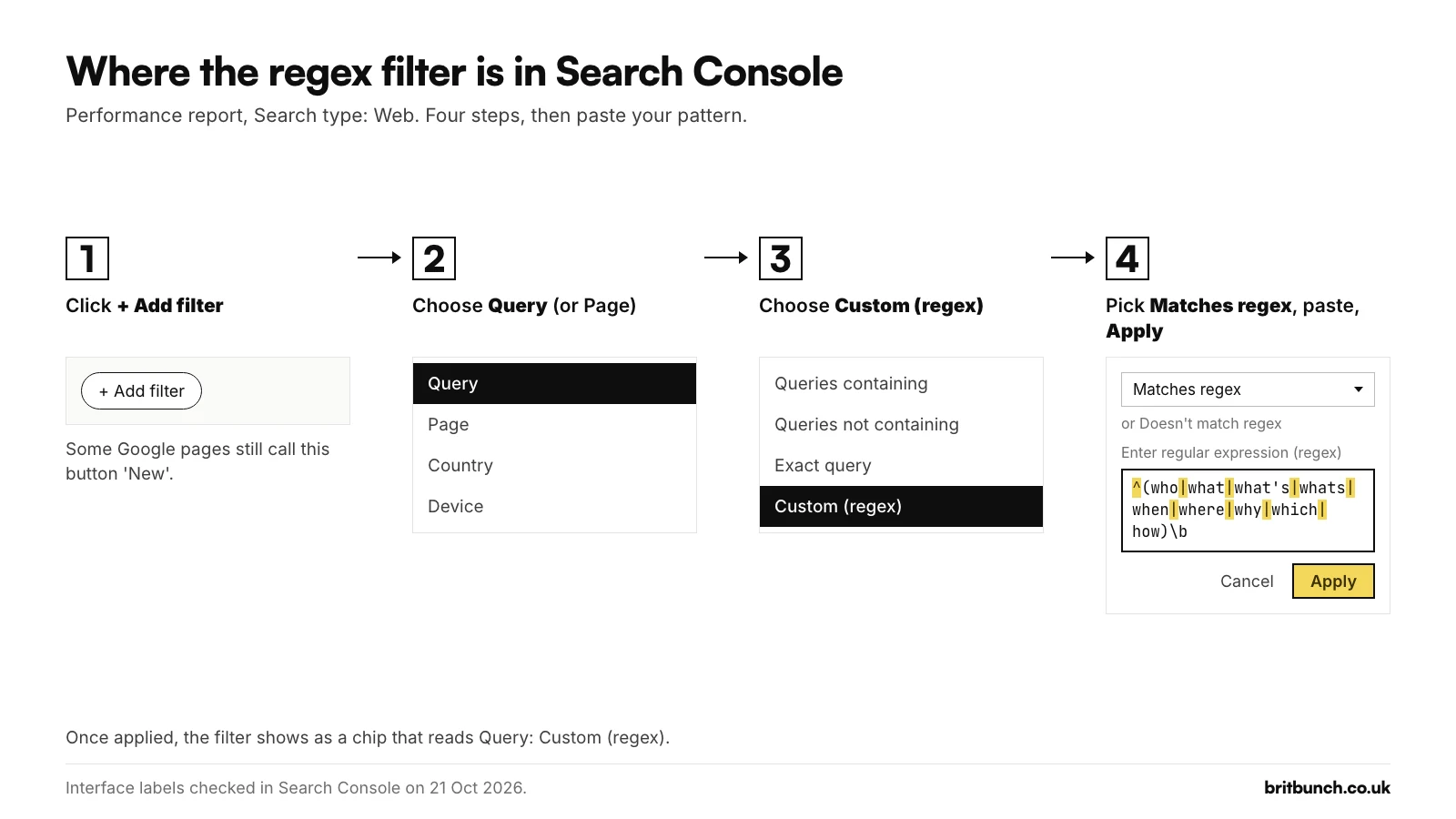
Open the Performance report for Search results, then:
- Click + Add filter and choose Query, or Page to filter web addresses.
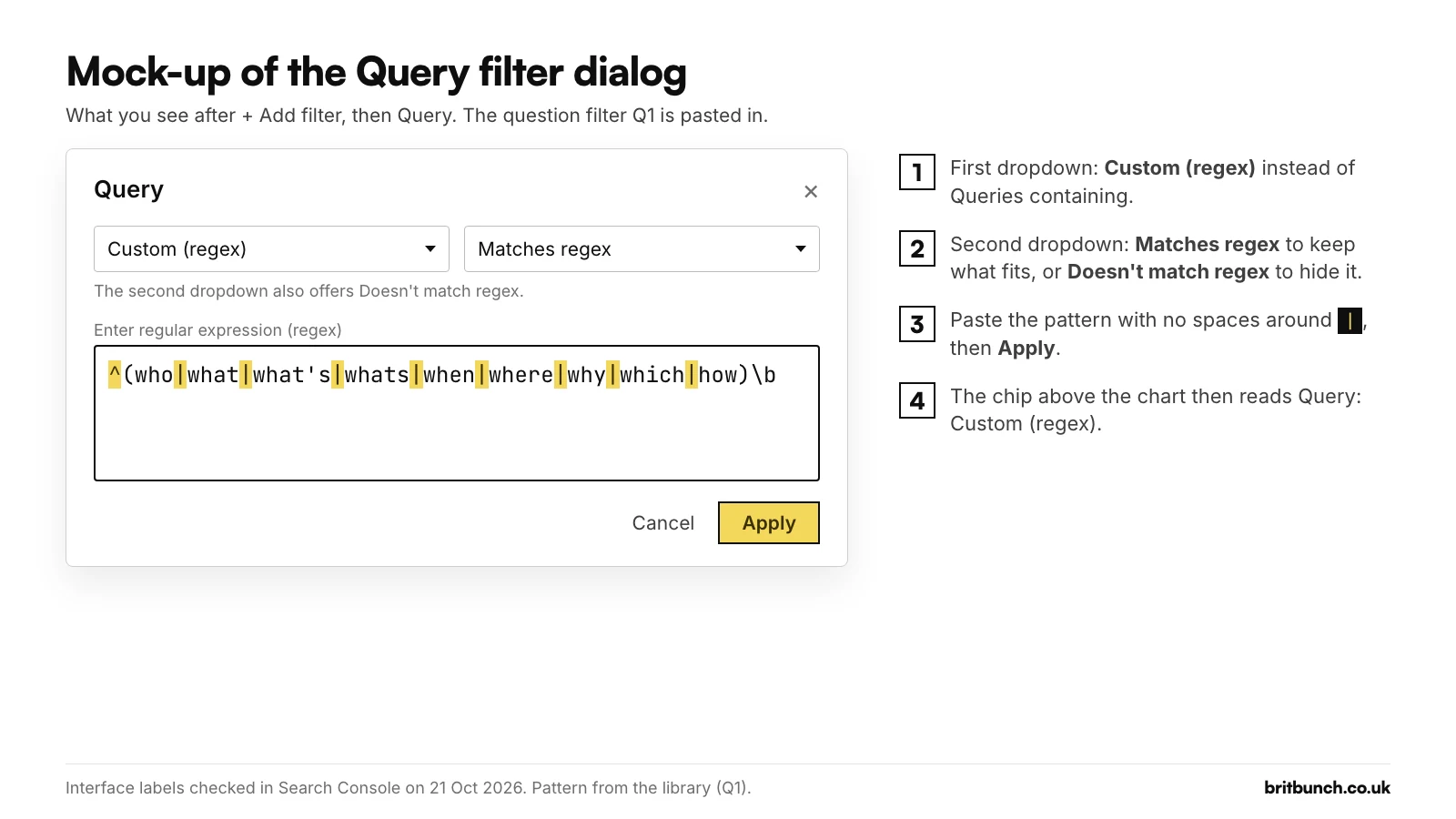
- In the first drop-down, choose Custom (regex).
- Leave the second drop-down on Matches regex, or switch it to Doesn't match regex to hide what fits.
- Paste your pattern into the box labelled "Enter regular expression (regex)" and click Apply.
The chip at the top then reads "Query: Custom (regex)". Keep the search type on Web with Text-based selected (the chip shows "Search type: Web"): the newer Multimodal option, for Lens and Circle to Search, has no queries for a pattern to work on.
The filter is stored in the report's web address (as query=~ and your pattern), so you can bookmark a filtered view.
The three rules: RE2, partial match, capitals ignored
All three come from Google's help page Advanced filtering and comparison: "The RE2 syntax is used"; a pattern "can match anywhere in the target string unless you use ^ (start of string) or $ (end of string)"; and "Default regex matching is not case-sensitive". RE2 leaves out some features other regex tools have, so patterns copied from older guides can fail. Advice to add (?i) dates from 2021, when Google's help briefly said matching was case-sensitive.
Your first filter in 60 seconds: find the questions people ask
Each question is a ready-made heading or FAQ answer. Add a Query filter, choose Custom (regex), leave it on Matches regex and paste this (Q1 in our library):
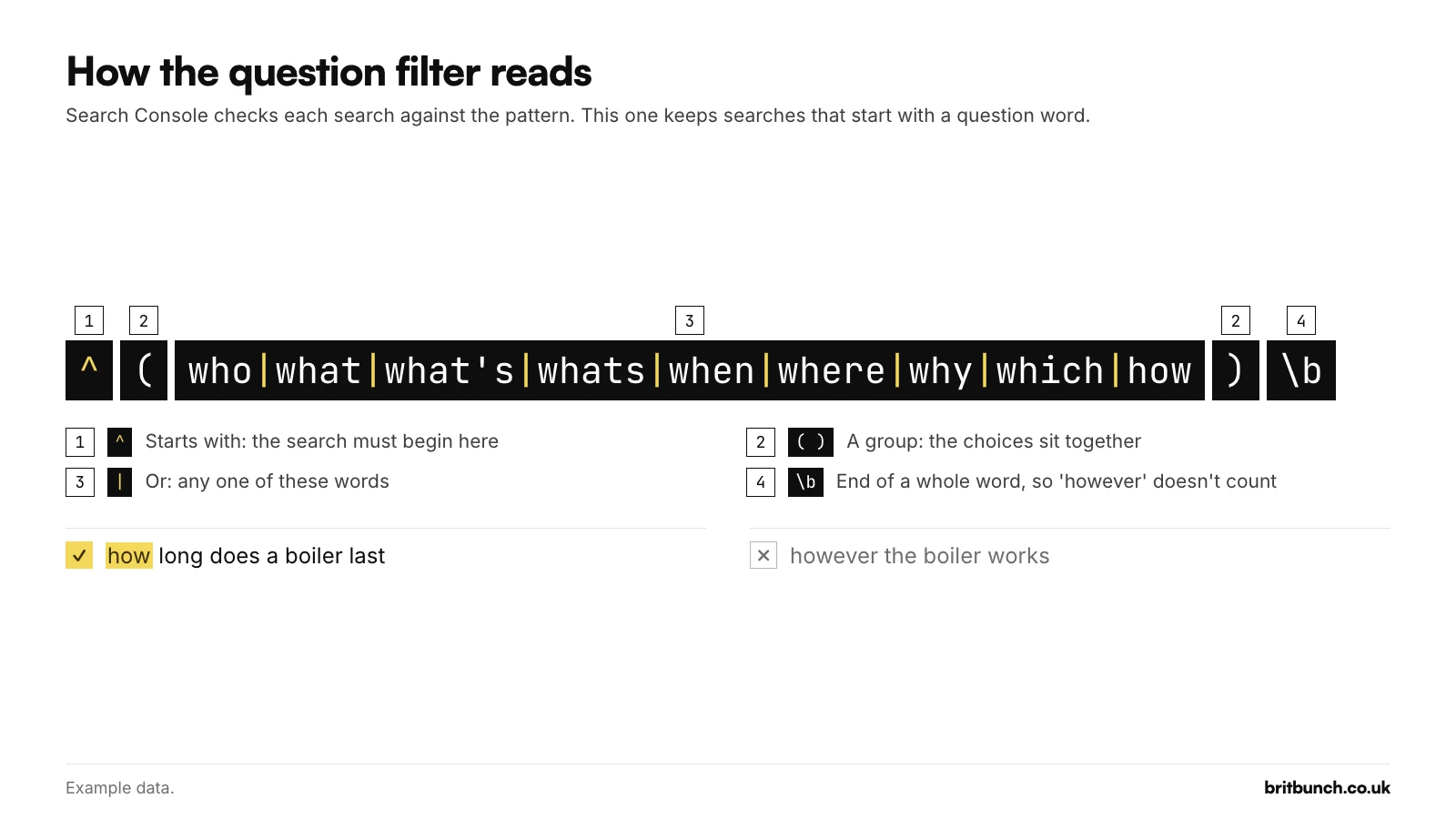
^(who|what|what's|whats|when|where|why|which|how)\b
It shows searches whose first word is who, what, what's, when, where, why, which or how. The \b means "end of a whole word", so "however" and "whatsapp" do not count. Try Q1 in our free tester first.
What the filter shows on the example site
Example data: Anytown Plumbing (example.co.uk), an invented plumbing and heating firm in Medway, Kent, over 28 days. The export is made up so the filters have something realistic to work on; nothing in it comes from a real Search Console property. Q1 keeps 33 of its 180 visible queries. They carry 4,354 of the 15,825 impressions Search Console lists against a search (27.5%), earn 23 clicks and sit at a weighted average position of 9.3, the foot of page one.
The top rows are jobs people try themselves before they call anyone: "how to bleed a radiator" (380 impressions), "why is my boiler losing pressure" (310) and "how to fix a dripping tap" (300). For a firm like that, the job is to make sure each guide answers the question in the searcher's own words and says plainly when to stop and call a plumber. Position 9.3 means these pages are seen but rarely chosen, so the title and the first line matter.
For other question types and long, prompt-style searches, see how to find questions in Search Console.
Regex in plain English: the 10 symbols you need
You do not need to learn regex as a language. These ten symbols do most of the work.
| means "or" (and why spaces break it)
The bar separates choices, and brackets keep them together. Google's help says to "surround the whole expression with parentheses", but its template puts a space each side of the bar. Spaces are characters in regex, so the filter then looks for them too. We checked live on 21 October 2026 that Search Console keeps them: a two-search pattern written with spaces around the bar returned nothing, and the same pattern without them returned both searches. On the example data the same thing happens:
(boiler service rochester|emergency plumber chatham)returns 2 queries and 290 impressions.(boiler service rochester | emergency plumber chatham)returns nothing (Example data).
One of Google's own older examples, (the world cup | world cup | 2022 world cup), has the same problem. Write the bar with no spaces.
^ and $: starts with, ends with
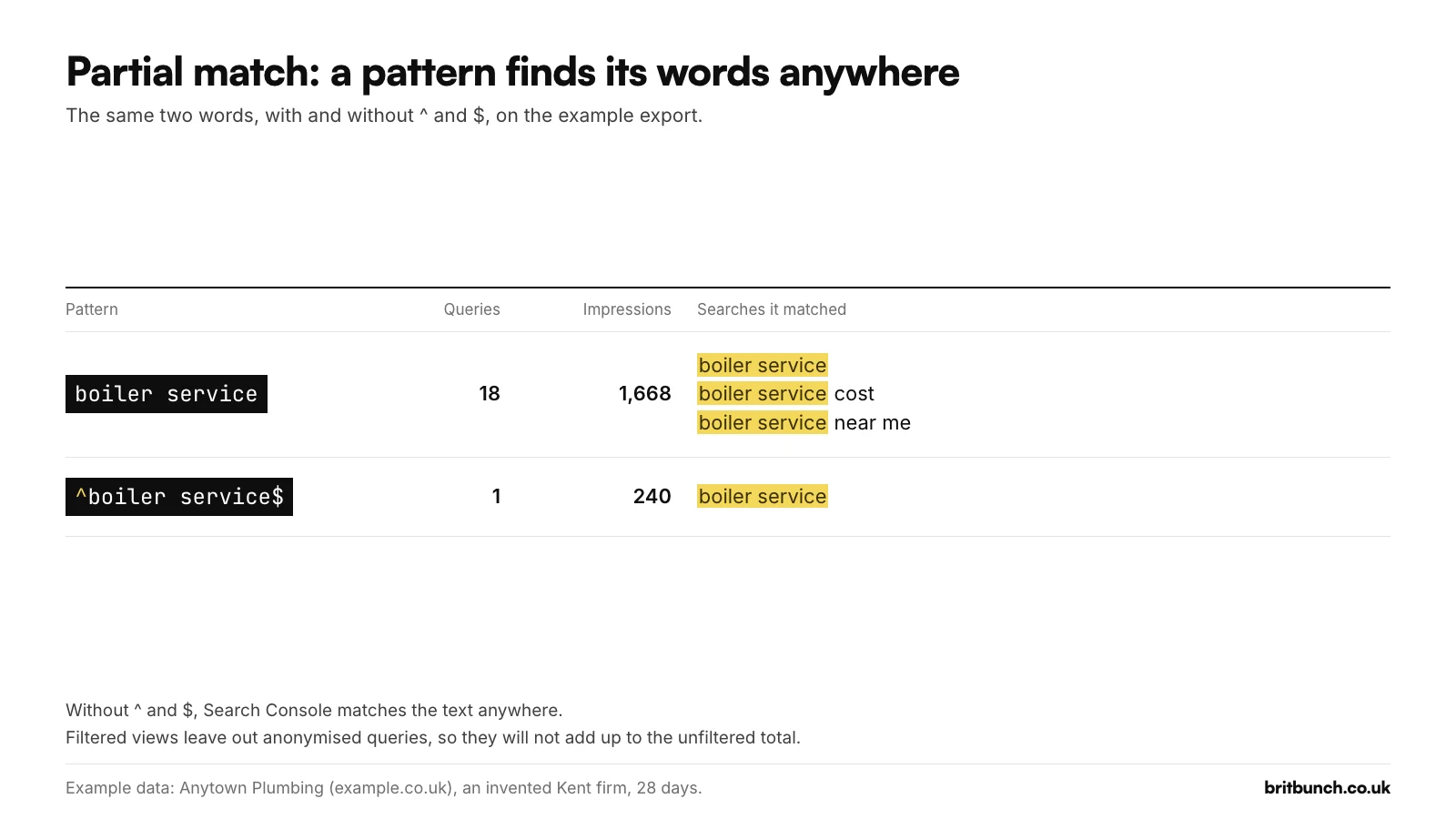
Because matching is partial, boiler service matches 18 of the example site's queries and 1,668 impressions, including "boiler service cost" and "how long does a boiler service take". ^boiler service$ matches only the exact search: 1 query and 240 impressions (Example data). Use ^ when the first word matters, as in Q1, and both for one exact search.
\b: whole words only
Partial matching also finds words inside words. On the example data, hire returns two searches: "hire a plumber for a day" and "sapphire bathroom taps". Sapp-hire. With \bhire\b only the first is left (Example data). \b marks the edge of a word, so wrap short words in it, as the library's hire filter (I3) does:
\b(agency|agencies|company|companies|consultant|consultancy|freelancer|specialist|expert|hire|services?)\b
One catch: in RE2, \b only understands the letters A to Z, digits and the underscore. So \bcafé\b misses "café near me" and \b£\d+ misses "haircut £20". Write \bcaf[eé] and £\d+ instead.
.*, ?, [ ], \d, \s and {n,m}
Google's table of common expressions leaves out ?, {n,m}, $, \b and escaping, so here are the ones you will use most:
.*means "anything, or nothing", useful between two words.?makes the thing before it optional:https?matches http and https. Google's table useshttps*, which means "http" followed by any number of s.[ ]means any one of the characters inside:caf[eé]matches cafe and café.\dis any digit and\sany space.{n,m}counts repeats, and{4,}means four or more. Our long-tail filter (L2) uses it to find searches of five or more words:
^\S+(\s+\S+){4,}$
A backslash makes a symbol ordinary again: \. is a real full stop, which matters in web addresses.
(?-i) for when capitals matter
Search Console ignores capitals unless you add (?-i), and the switch only applies to what follows it: blog(?-i)ABC matches "BLOGABC" but not "blogabc". It is mostly useful for page addresses with capitals.
Queries versus Pages
Page filters work on the full web address, including https:// and your domain. So ^/blog/ returns nothing, which we checked live on 21 October 2026, while on the example site /blog/ returns 8 pages, 9,060 impressions and 35 clicks, the blog index included (Example data). The library's blog filter (P1) adds .+ so the index page itself is left out:
/blog/.+
To pin a single page, write the whole address and escape the dots. The homepage filter (P3), written for the example domain:
^https?://(www\.)?example\.co\.uk/?$
Google records the final address after any redirects and assigns most data to a page's canonical URL, so patterns aimed at tracking parameters or duplicate addresses can return nothing. You can also combine a Query filter with a Page filter, for example questions that land on blog posts.
Matches versus Doesn't match: excluding words without lookaheads
Matches regex keeps what fits; Doesn't match regex, added in June 2021, hides it. That second mode is how you exclude words, because RE2 has no lookahead. The library's non-brand filter (B2), written for the example brand Anytown Plumbing, is a brand pattern set to Doesn't match regex:
\b(anytown[ -]?plumbing|any ?town ?plumbing|anytown ?plumbers|anytown ?heating)\b
To ask for two words in any order, write both orders joined by a bar, in the shape a.*b|b.*a. The library's cost check (K1), written for a boiler firm, works this way:
\bboiler\b.*\b(cost|costs|price|prices|pricing)\b|\b(cost|costs|price|prices|pricing)\b.*\bboiler\b
Search Console will not warn you about a pattern it cannot run. On 21 October 2026 we applied a lookahead in a live property. The dialog accepted it and the report showed 0 clicks, 0 impressions and No data, with no error. That looks exactly like "nobody searched for this", so test a pattern before trusting an empty result.
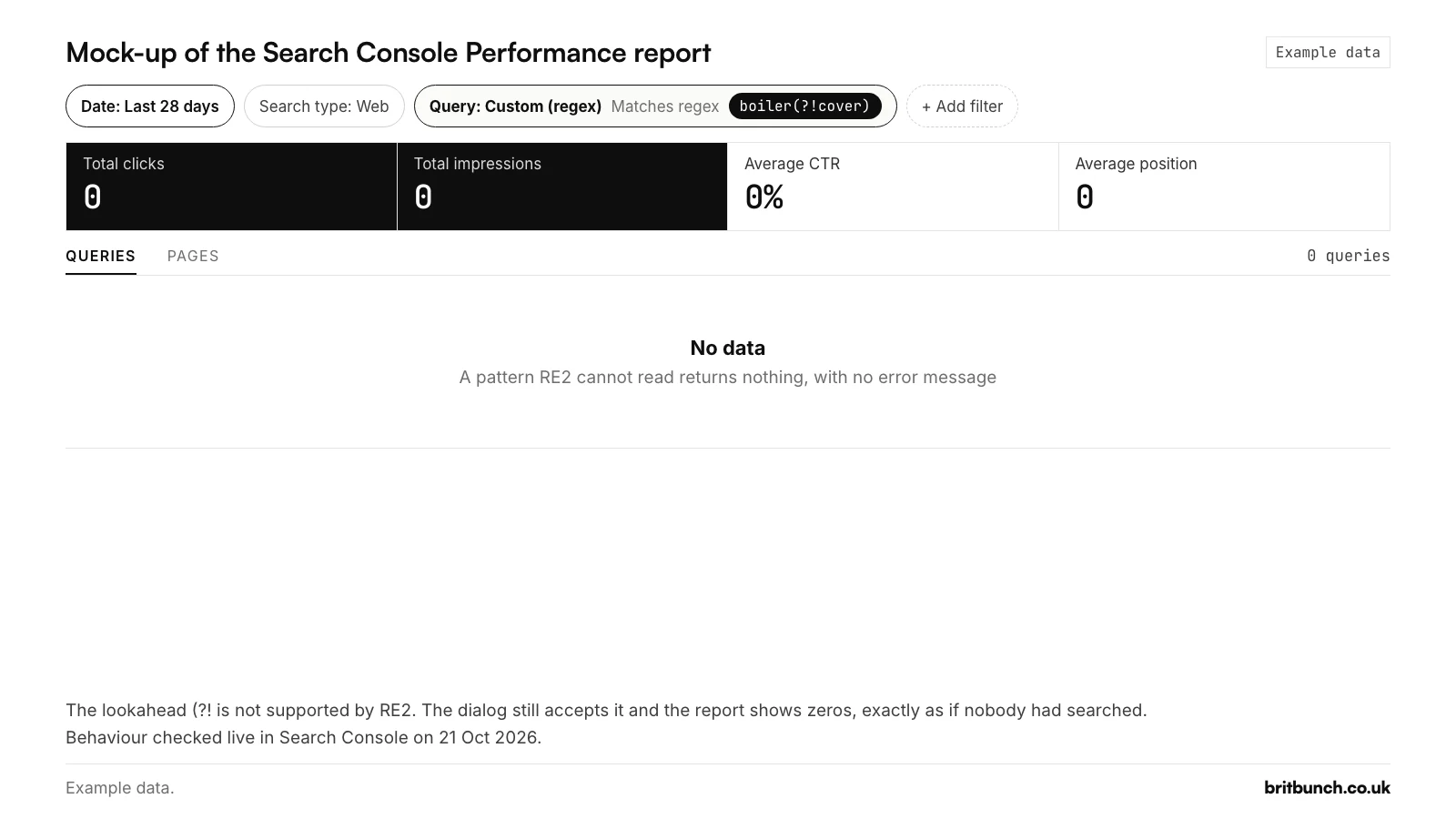
boiler(?!cover) applied as a Query filter. An unsupported pattern fails silently and looks like zero searches. Behaviour checked live on 21 October 2026. Example data.Why your filtered numbers do not add up
Three things make filtered totals look wrong:
- Anonymised queries. Google hides searches that "aren't issued by more than a few dozen users over a two-to-three month period" (Search Central, October 2022). They count in chart totals, "unless a query filter is applied".
- Match plus doesn't match is not the whole. Google says the two may not add up to the unfiltered total. In Google's own example, 175 plus 275 makes 450, against a chart total of 550.
- Row limits. The table shows at most 1,000 rows, and Google "stores and shows only the most important data rows".
Search Console now says so on screen whenever a filter is on: "Chart totals and table results might be partial when filters are applied."
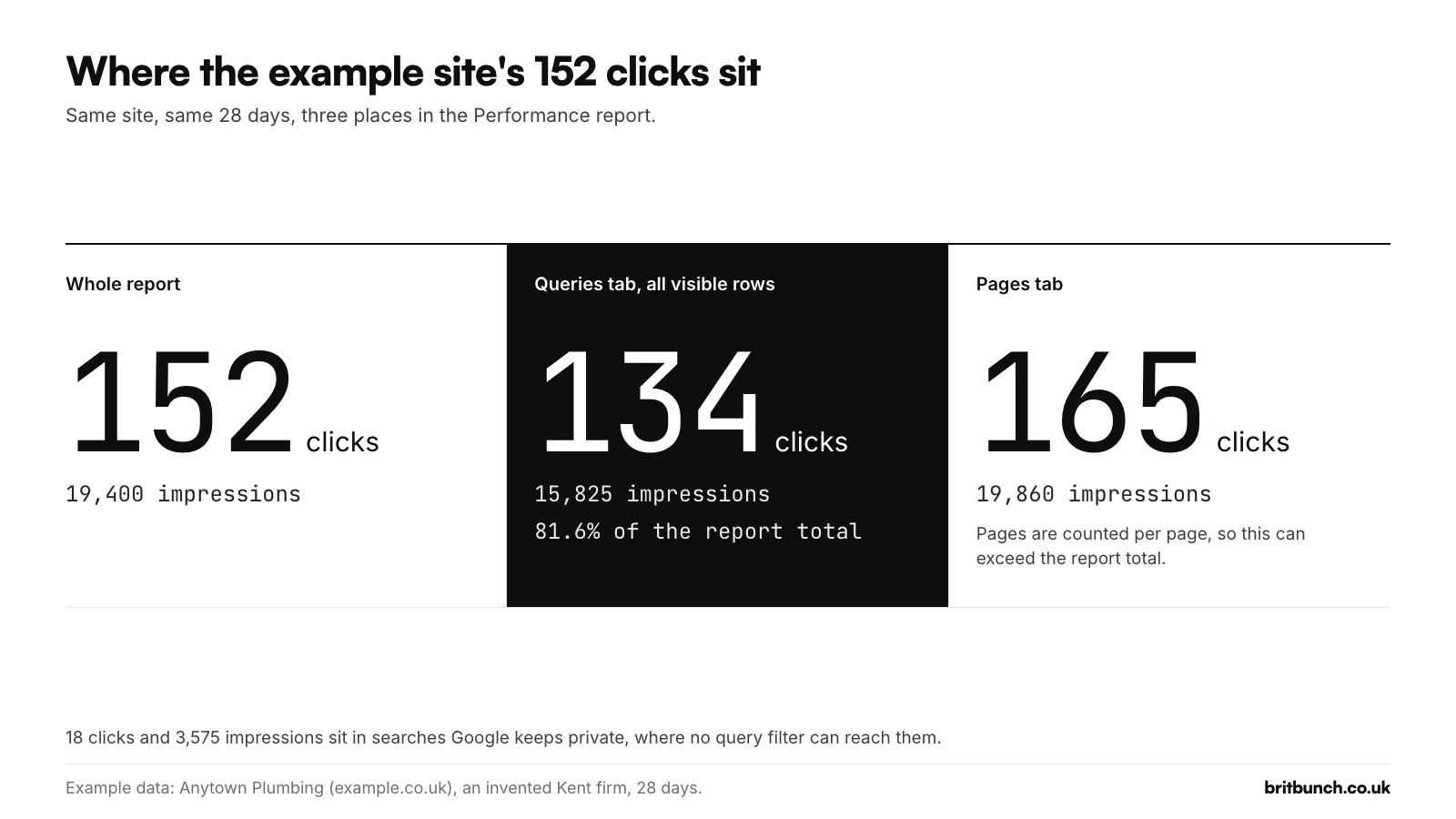
On a small site the gap can be a large part of the story. On the example data, the report shows 152 clicks and 19,400 impressions. The 180 visible queries carry 15,825 of those impressions (81.6%) and 134 of the clicks, so 18 clicks and 3,575 impressions belong to searches Google does not list. The Pages tab shows 165 clicks and 19,860 impressions, more than the report total, because Google counts pages separately (Example data: Anytown Plumbing, 28 days). So read filtered views for patterns and positions, not for totals.
Regex or Google's newer features?
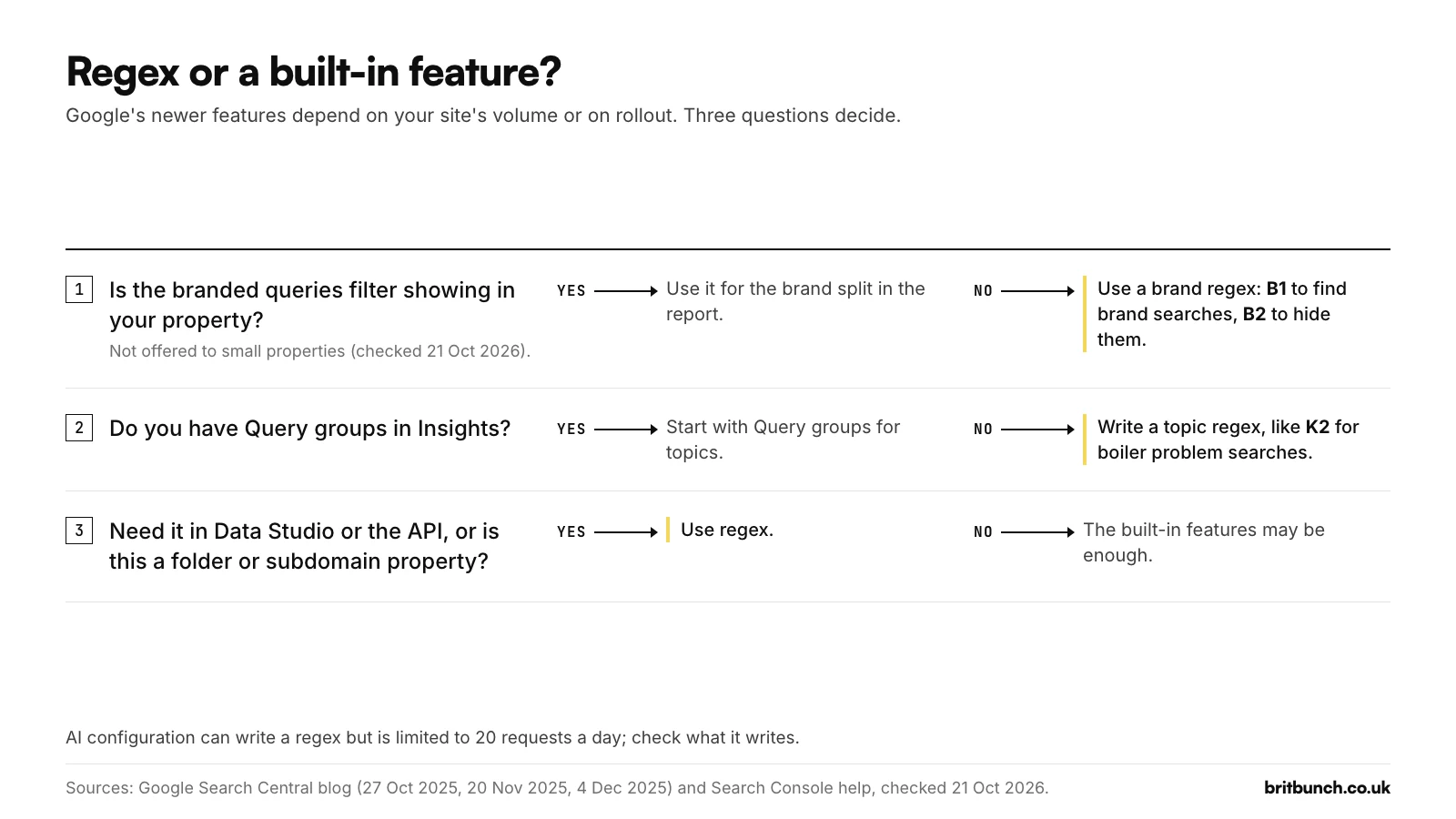
Since late 2025 Google has added three features that overlap with regex, each with limits:
- Branded queries filter. Announced on 20 November 2025 and opened to all eligible sites on 11 March 2026, it separates brand from non-brand searches with AI-assisted classification. Google says it "is NOT based on a regular expression", that it "isn't available for sites with a low number of impressions", and that "Some queries might be incorrectly identified". On 21 October 2026 we confirmed it is missing from a small property's + Add filter menu.
- Query groups (27 October 2025) cluster similar searches in Insights, but "are available only to properties that have a large volume of queries".
- AI-powered configuration (4 December 2025, experimental) turns plain English into filters, regex included. Only some users see it, each "limited to 20 requests per day", and Google says it "may generate filters that don't match your request".
Regex works on small properties, you control the list, and the Search Console API accepts RE2 patterns too. In Data Studio, use REGEXP_CONTAINS and add (?i), because Data Studio is case-sensitive. The brand comparison is in branded versus non-branded searches.
What changed from 2021 to 2026
| When | What changed |
|---|---|
| 7 Apr 2021 | Regex filters launch. Google's help says matching is case-sensitive. |
| 26 May to 3 Jun 2021 | Google's help changes to "not case-sensitive" (no announcement found). |
| 2 Jun 2021 | Doesn't match regex arrives. |
| 25 Oct 2021 | Regex filters in the Search Console API. |
| 21 Feb 2023 | Bulk data export to BigQuery. |
| 27 Oct 2025 | Query groups in Insights. |
| 20 Nov 2025 | Branded queries filter announced. |
| 4 Dec 2025 | AI-powered configuration, experimental. |
| 11 Mar 2026 | Branded filter opens to all eligible sites. |
| Apr 2026 | Looker Studio is renamed Data Studio again. |
| Apr to May 2026 | Regex help moves to a new page, which says "+ Add filter" and drops the line that invalid syntax "will return no matches". |
| 3 Jun 2026 | Generative AI performance report. |
| 24 Sep 2026 | "Web: multimodal" search type, which has no queries. |
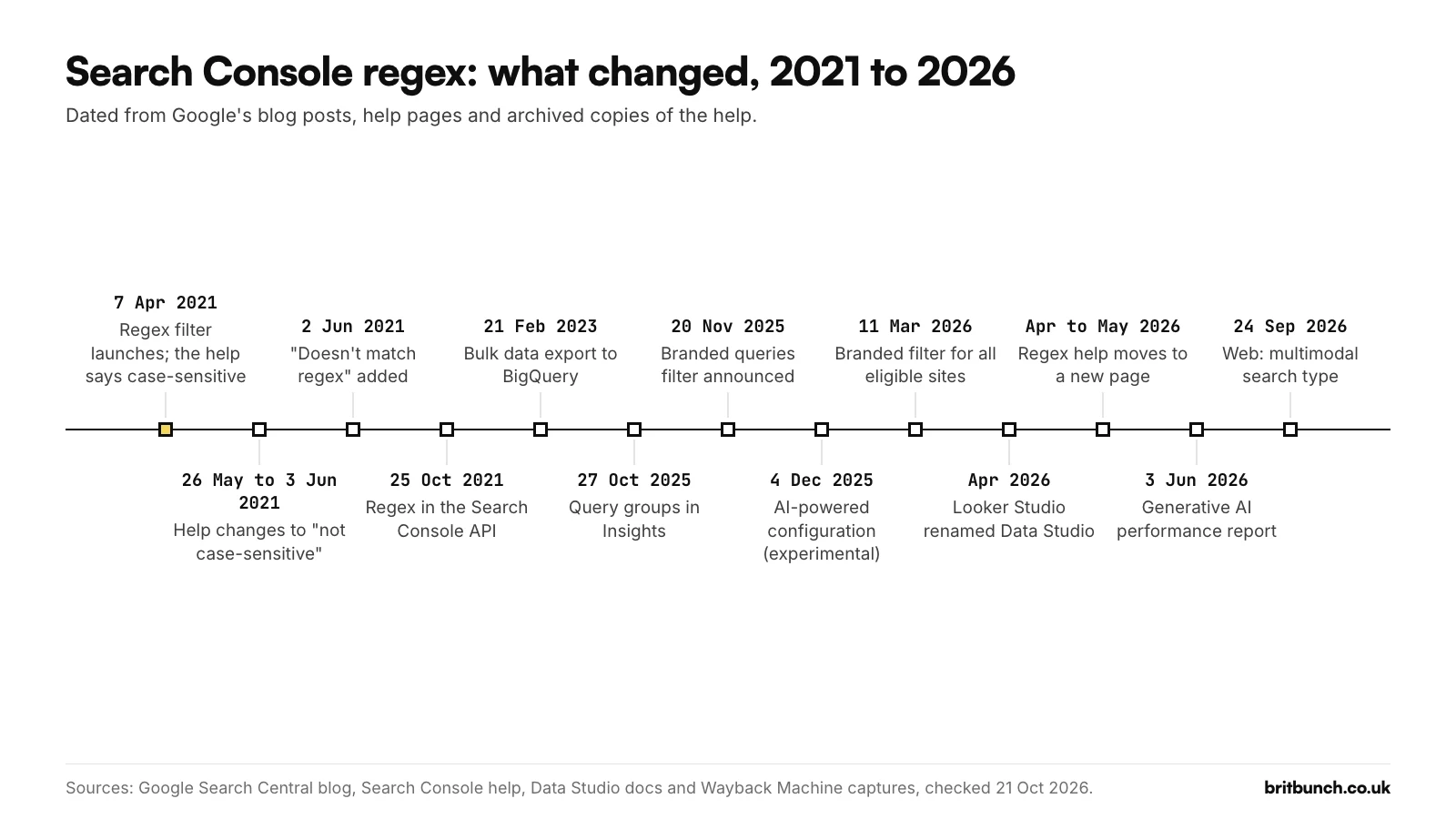
Ten filters to start with
Each is in our library of 50 Search Console regex filters with examples and a next step. Swap the example brand (Anytown Plumbing), the Kent towns and the example domain for your own. The examples were tested in RE2 but hand-picked, so try each filter on your own searches first.
1. Q1: starts with a question word. Test Q1
^(who|what|what's|whats|when|where|why|which|how)\b
2. Q4: cost and time questions, such as "how much" and "how long". Test Q4
^how (much|long|many|often|soon)\b
3. B2: non-brand searches. Set it to Doesn't match regex. Test B2
\b(anytown[ -]?plumbing|any ?town ?plumbing|anytown ?plumbers|anytown ?heating)\b
4. I1: price and cost intent, including a £ sign anywhere. Test I1
\b(price|prices|pricing|cost|costs|how much|fee|fees|cheap|cheapest|affordable|budget|quote|quotes)\b|£
5. I3: hire a provider. Test I3
\b(agency|agencies|company|companies|consultant|consultancy|freelancer|specialist|expert|hire|services?)\b
6. G2: Kent towns (safer list). Deal, Sandwich, Hythe and Rainham only count when followed by Kent. More in local SEO regex for Search Console. Test G2
\b(kent|gravesend|northfleet|dartford|swanscombe|greenhithe|ebbsfleet|maidstone|medway|rochester|chatham|gillingham|strood|sittingbourne|faversham|sheerness|canterbury|whitstable|herne bay|margate|ramsgate|broadstairs|dover|folkestone|ashford|tenterden|tonbridge|tunbridge wells|sevenoaks|swanley|westerham|edenbridge|west malling|snodland|aylesford|cranbrook|paddock wood|bluewater)\b|\b(deal|sandwich|hythe|rainham),? kent\b
7. G3: service and town, either order. The RE2 way of saying "both words". Test G3
\b(plumber|plumbers|plumbing|boiler|heating|bathroom)\b.*\b(rochester|chatham|gillingham|strood|medway|kent)\b|\b(rochester|chatham|gillingham|strood|medway|kent)\b.*\b(plumber|plumbers|plumbing|boiler|heating|bathroom)\b
8. L2: long-tail, five or more words. Test L2
^\S+(\s+\S+){4,}$
9. K1: one topic, either word order. Then open the Pages tab: if two pages share the impressions, they may be competing. Test K1
\bboiler\b.*\b(cost|costs|price|prices|pricing)\b|\b(cost|costs|price|prices|pricing)\b.*\bboiler\b
10. P1: blog posts only (a Page filter). Test P1
/blog/.+
Test before you paste: our free tester
A tester that uses your browser's built-in regex engine is not testing RE2: it rejects (?i) and (?-i), which Search Console accepts, and runs lookaheads, which Search Console cannot. So a pattern can pass there and still come back empty in Search Console.
Our Search Console regex tester checks a pattern with an RE2 engine against example searches or your own list, and flags common mistakes in plain English. The query sorter sorts every query in your Search Console export into groups, such as questions, local, price and brand, with totals for each. On regex101, choose the Golang flavour and tick the i flag: Go uses RE2 syntax but is case-sensitive by default.
Free: the regex library, cheat sheet and tools
All 50 filters, each tested in RE2 on 21 October 2026, with examples and what to do next.
- Download the library as a CSV (opens in Excel or Google Sheets)
- Download the cheat sheet (PDF)
- Test a pattern in the free regex tester
- Sort your own export with the query sorter
Limits worth knowing
- 1,000 rows. The table shows at most 1,000 rows, and an export from the interface is capped at 1,000 rows.
- 16 months, a few days behind. The report holds 16 months of data, and Google says new data usually arrives within 2 to 3 days.
- One Query filter at a time. Adding a second reopens the first, so put every term into one pattern.
- 4,096 characters. The regex box accepts up to 4,096 characters (checked 21 October 2026), the same limit Google documents for the API.
- Text only. For clicks or position, use the filter built into the table.
- More rows. The API returns up to 25,000 rows per request, and Google gives a ceiling of 50,000 rows per day per site per search type. Bulk export to BigQuery has no daily row limit but still leaves out anonymised queries.
FAQs
Is the Search Console regex filter case-sensitive?
No. Google's help says regex matching is not case-sensitive by default, so (?i) is not needed; add (?-i) when capitals matter. More in regex not working? 9 fixes.
Can I use lookaheads?
No. RE2 does not support them, and Search Console shows No data rather than an error. Use Doesn't match regex instead; our troubleshooting guide has the other fixes.
Is there a character limit?
Yes. The regex box accepts up to 4,096 characters (checked 21 October 2026). If a list runs over, split it and run each part as its own view.
Does regex work in the Discover and News reports?
For pages, yes. Google's Discover and Google News help pages document a Custom (regex) filter for page addresses. Those reports have no queries.
Can I filter AI Mode or AI Overviews traffic?
Not by query. Google reports AI Overviews and AI Mode within the Web search type, mixed in with other searches, and the Generative AI features report has pages but no queries. A Page regex does work there: on 21 October 2026 we confirmed that a Custom (regex) Page filter applies in that report.
If you would like a hand
Regex filters cost nothing, and a bookmarked view takes seconds to re-run. If you would rather talk through what your own Search Console is showing, see how our SEO service works.