
To see only your local searches in Google Search Console, open the Performance report, choose + Add filter, then Query, set the first dropdown to Custom (regex) and paste a pattern that lists your towns as whole words. Search Console then shows only searches that name your area. On the example export used through this series, an invented 28 days for Anytown Plumbing, a fictional firm in Medway, Kent, searches naming Kent places sit at a weighted position of 7.9, page one, against 11.5 for the visible searches as a whole (Example data). Below are the local filters, each tested in Google's RE2 engine, the traps in UK place names, and what the example numbers show.
Search Console behaviour last checked 21 October 2026. The figures in this guide are example data for Anytown Plumbing, an invented Kent firm, not from any real property.
Three rules from Google's help on advanced filtering decide how every pattern on this page behaves:
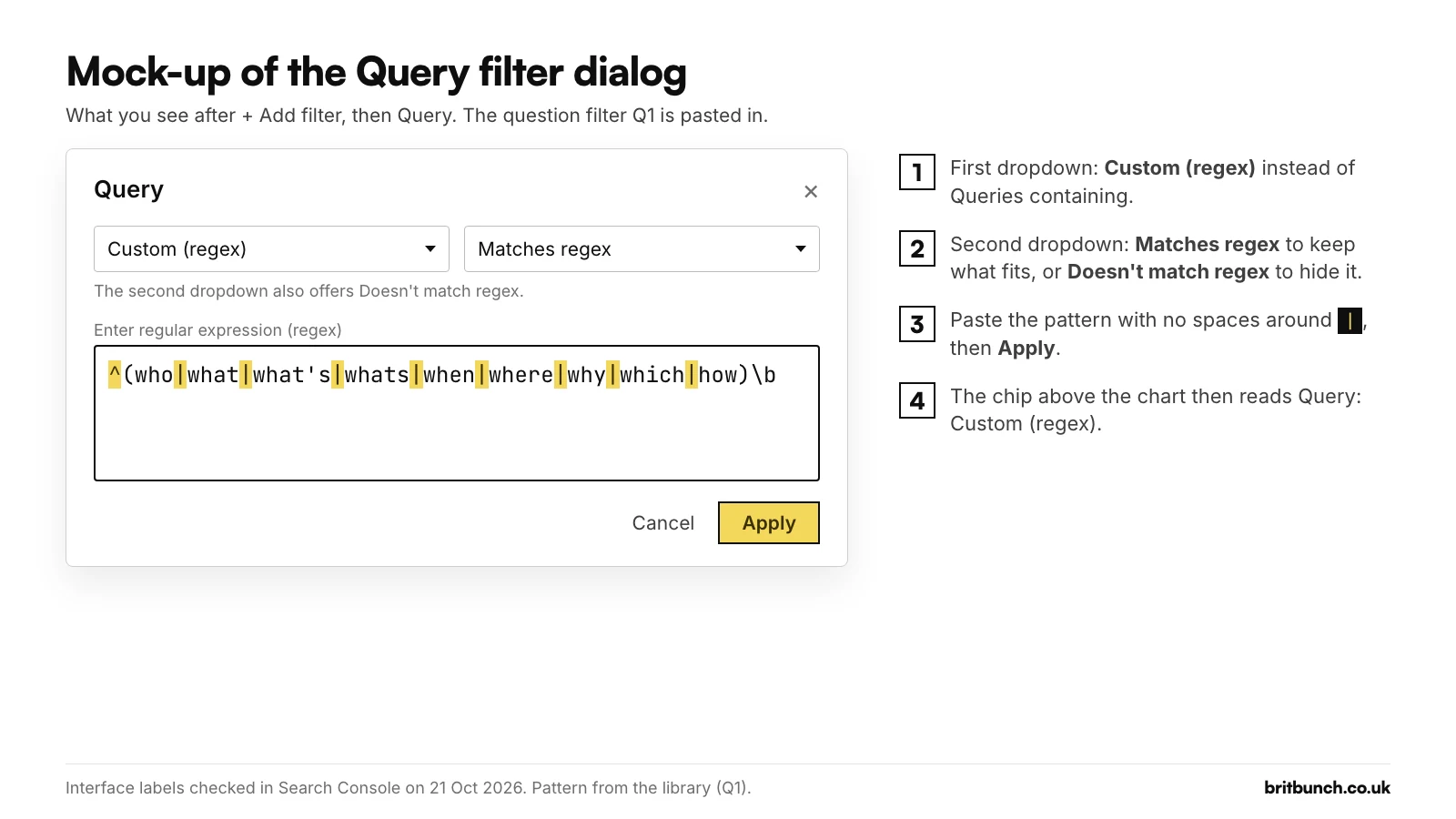
- It uses RE2. Search Console reads patterns with Google's RE2 syntax, which has no lookahead or lookbehind. That matters for "service and town" searches, covered below.
- It matches part of the search. A pattern can match anywhere in the search unless you use
^(starts with) or$(ends with). So the letters kent on their own also find "kentucky fried chicken". - It ignores capitals. Matching is not case-sensitive by default, so Gravesend and gravesend are the same to the filter and you don't need to add anything for capitals.
Where to paste: + Add filter, then Query, then Custom (regex), then Matches regex (or Doesn't match regex), paste and click Apply. Keep the "Search type: Web" chip on Text-based; Google says the newer multimodal search type has no queries dimension.
New to regex? Start with our Search Console regex guide. All 50 patterns are in our copy-and-paste library; this article covers the local ones.
Why local searches deserve their own view
A search that names a town usually comes from someone who wants a business in that place. In the example export, 47 searches naming Kent places sit among 180 visible ones. On their own they tell a different story from the report as a whole: 46 of the site's 134 visible clicks and a weighted position of 7.9, against 11.5 overall (Example data). A whole-report view hides that.
"Near me" searches (G1)
near me|nearby|near by|nearest|close to me|close by|around me|in my area|open now
G1 shows searches containing near me, nearby, nearest, close to me, in my area or open now. Test G1 on your own searches.
Example data. G1 finds 5 of the 180 visible queries, 845 impressions and 2 clicks, led by "plumber near me" with 320 impressions at position 14.6: a big search the example firm is seen for but rarely chosen. Local searches can bring up map results as well as websites, so if G1 finds rows for you, check your Google Business Profile as well as the page they land on.
If you run one of those businesses, three sector filters from our library pick out urgent, booking and opening-hours searches.
Trades, urgent jobs (V1):
emergency|urgent|24 ?(hours?|hrs?)|24/7|24-7|same day|out of hours|tonight|asap|burst|leak(s|ed|ing|y)?\b|no (heating|hot water|power|electric)|tripping|locked out
Salons and barbers, booking searches (V2):
\bbook|appointment|availab|walk[ -]?ins?\b|open (today|now|late|sunday|on sunday)|opening (hours|times)|last minute|same day
Restaurants and takeaways, "open now" searches (V3):
open (now|today|late|tonight|on sunday|sunday|christmas day|boxing day|bank holiday)|opening (hours|times)|what time (does|do|is)|late night|24 ?hours?
On the example plumber's data V1 finds 25 queries and 25 clicks, while V2 and V3 pick up 3 and 1 through shared words such as "same day" and "24 hour" (Example data). Each pack is written for its own sector, so expect the others to find little on yours.
Your towns as whole words (G2)
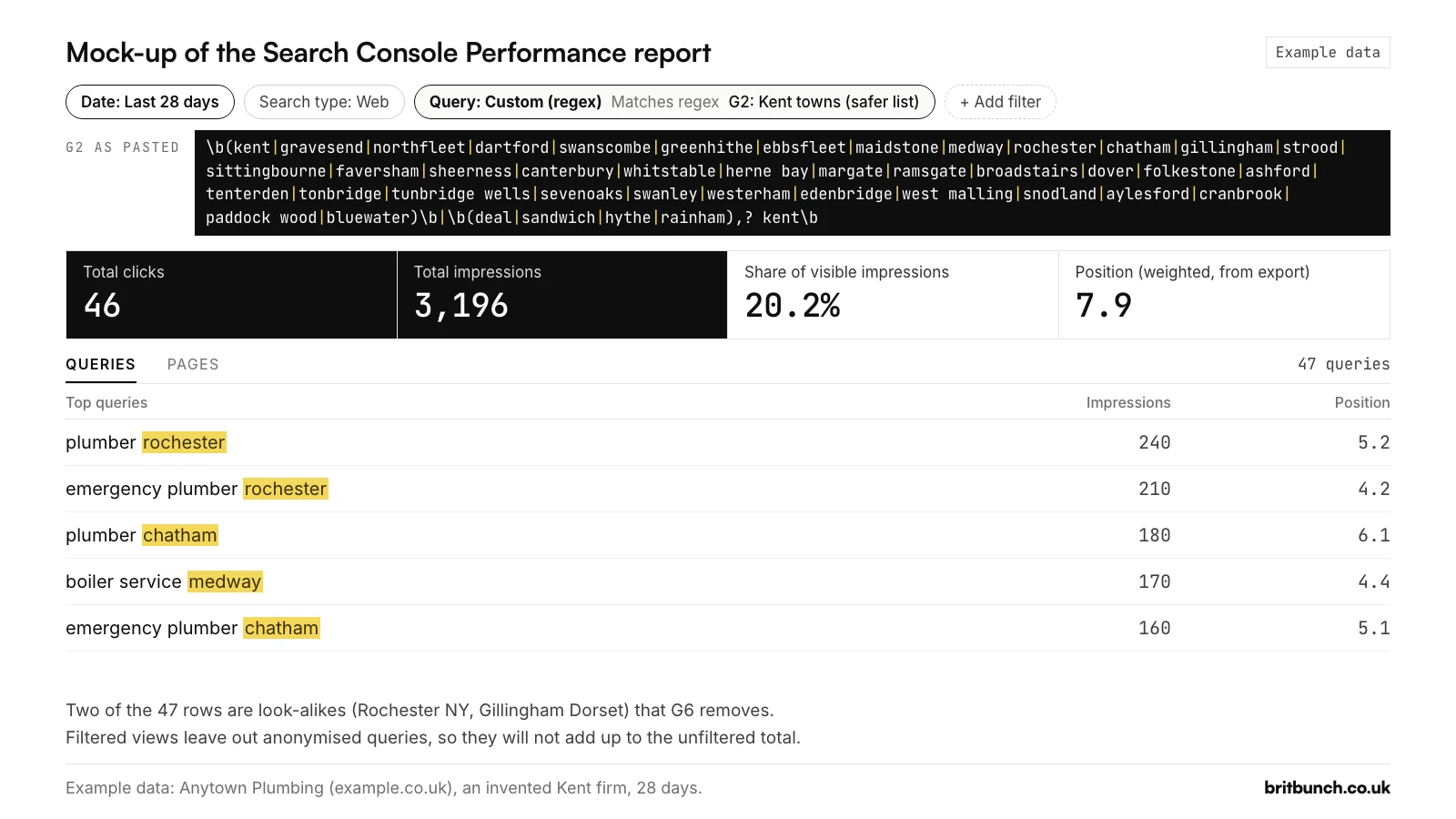
\b(kent|gravesend|northfleet|dartford|swanscombe|greenhithe|ebbsfleet|maidstone|medway|rochester|chatham|gillingham|strood|sittingbourne|faversham|sheerness|canterbury|whitstable|herne bay|margate|ramsgate|broadstairs|dover|folkestone|ashford|tenterden|tonbridge|tunbridge wells|sevenoaks|swanley|westerham|edenbridge|west malling|snodland|aylesford|cranbrook|paddock wood|bluewater)\b|\b(deal|sandwich|hythe|rainham),? kent\b
G2 shows Kent and Kent towns as whole words. The \b at each end means "whole word only", so kent doesn't count inside kentucky. Deal, Sandwich, Hythe and Rainham are handled separately (see the next section). Open G2 in the tester and swap in your own towns.
When you edit the list:
- No spaces either side of
|. Search Console doesn't strip them, and RE2 treats them as characters. In a live check on 21 October 2026, a two-search pattern returned both rows without spaces and nothing with a space either side of the bar. On the example data,(boiler service rochester|emergency plumber chatham)returns 2 rows and 290 impressions, and the spaced version returns nothing. - Spaces inside a town name are fine. "tunbridge wells" and "herne bay" match with the space between the words.
- Length isn't a worry. G2 is 426 characters, and the regex box in Search Console accepts up to 4,096 characters (checked 21 October 2026).
Example data. G2 finds 47 of the 180 visible queries in the example export, with 3,196 impressions (20.2%) and 46 clicks at a weighted position of 7.9. Two of the 47 are look-alikes, "plumber rochester ny" and "gillingham dorset plumber", which G6 below removes.
Kent has a Deal and a Sandwich
Kent has towns called Deal and Sandwich. Put them in a plain town list and the filter will count "best deal on boilers" and "sandwich shop near me" as local searches. Hythe and Rainham are also places outside Kent: there is a Hythe in Hampshire and a Rainham in the London Borough of Havering.
G2 deals with this in its second half:
\b(deal|sandwich|hythe|rainham),? kent\b
That part counts the four names only when kent follows, with or without a comma. "plumber in deal kent" and "deal, kent" match; "best deal on boilers" doesn't.
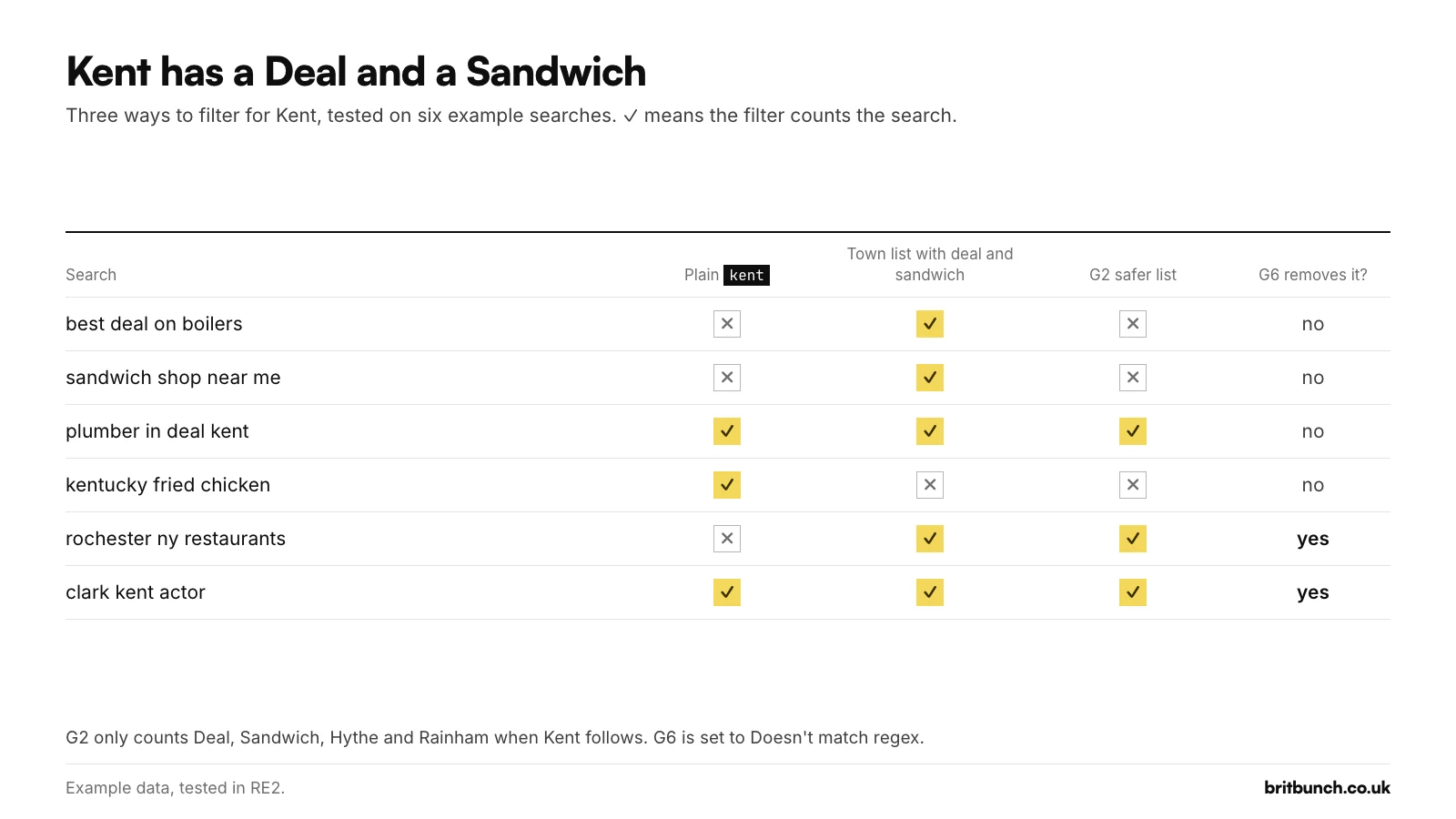
The trade-off: "plumber deal" with no kent after it is missed. If you're based in Deal or Sandwich, move your town into the first list and check the rows by eye.
Removing Kent State, Rochester NY and Clark Kent (G6)
Shared names bring in searches from elsewhere: Rochester in New York, Kent State University, Clark Kent. G6 lists the common look-alikes and is meant for Doesn't match regex:
\b(kent state|clark kent|kent (ohio|wa)|rochester (ny|new york|mn|minnesota)|gillingham dorset|ashford (surrey|middlesex)|dover (de|delaware|nh)|canterbury (nz|new zealand|bankstown)|rainham (essex|london)|chatham (nj|ontario|house))\b
It hides Kent State, Clark Kent, Rochester NY, Gillingham in Dorset, Dover in Delaware and similar, and keeps searches such as "dover dentist", "rochester kent roofer" and "gillingham plumber". The closing \b is what keeps "dover dentist" in. Test G6.
One catch, found in a live Search Console check on 21 October 2026: you can only have one Query filter at a time. With G2 applied, + Add filter and then Query just reopens G2 for editing, so you can't stack G6 on top. Two ways round that:
- Check first. Run G6's pattern with Matches regex on its own. No rows means none of the look-alikes on its list are in your data, so it has nothing to remove from your G2 view. Example data: on the example export it finds three rows, "plumber rochester ny", "gillingham dorset plumber" and "rainham essex emergency plumber", 7 impressions between them.
- If it finds rows, export the report and use our query sorter, with a G6 bucket above your town bucket, switched to Matches regex, and First match wins kept on, so look-alikes are sorted out first. Or leave those rows out of your local total by hand.
G6 only removes a look-alike when the search names the other place. A search such as "gillingham plumber" could mean the Gillingham in Kent or the one in Dorset, and the search doesn't say which, so G2 counts it and G6 leaves it alone (Example data).
Service + town in either order: the RE2 "and"
People type "boiler service rochester" and "rochester boiler service". To catch both, the filter has to say "this service and this town, in any order". Many other regex engines would use a lookahead, which RE2 doesn't support, so the pattern is written as A.*B|B.*A: a service, then anything, then a town; or a town, then anything, then a service.
\b(plumber|plumbers|plumbing|boiler|heating|bathroom)\b.*\b(rochester|chatham|gillingham|strood|medway|kent)\b|\b(rochester|chatham|gillingham|strood|medway|kent)\b.*\b(plumber|plumbers|plumbing|boiler|heating|bathroom)\b
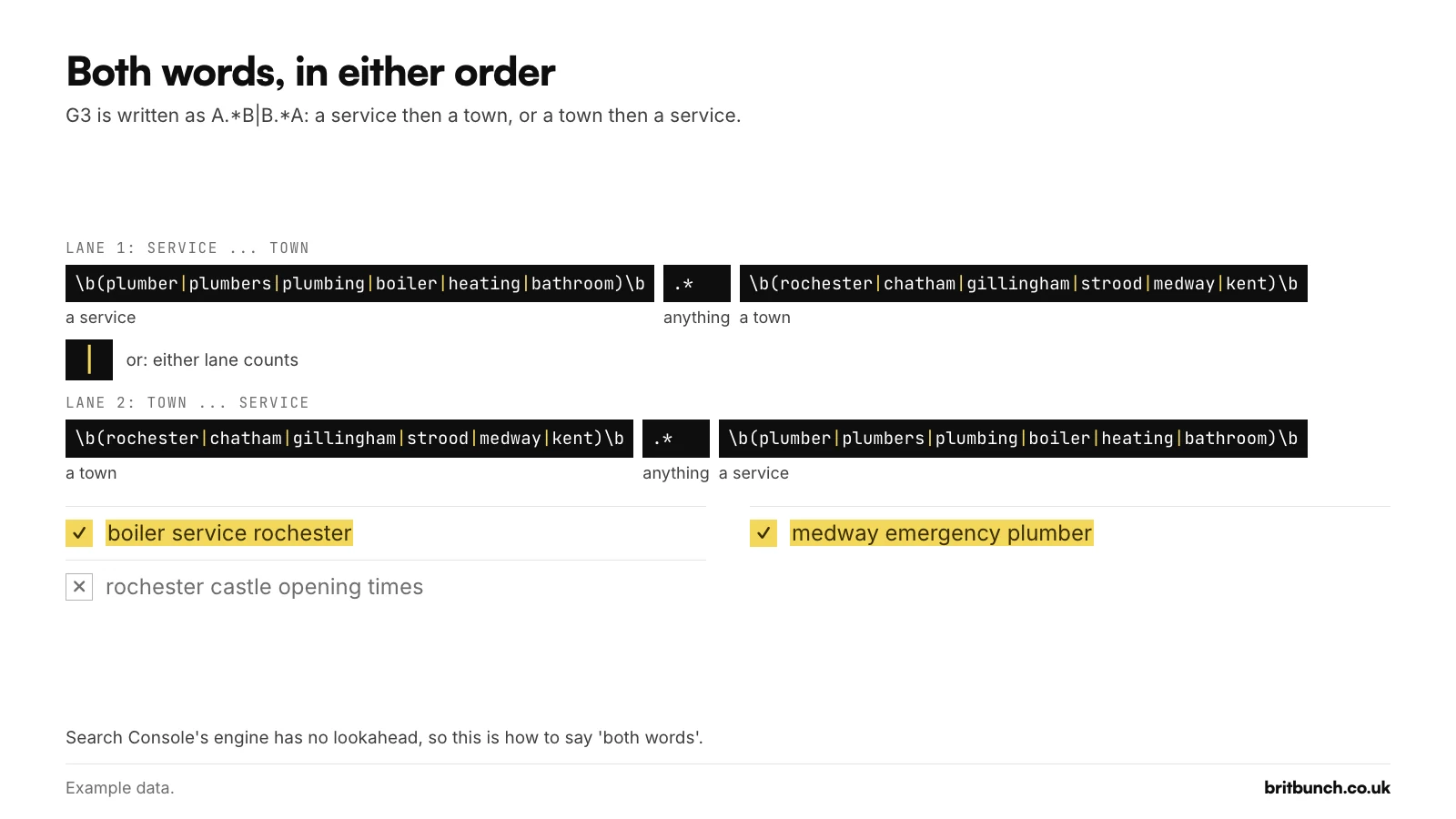
Test G3 and change the services and towns on both sides of the bar. Keep the two lists the same on each side, or the two orders will match different things.
Don't paste a lookahead copied from another tool. In a live property on 21 October 2026, a lookahead pattern was accepted without a warning, and the report showed 0 clicks, 0 impressions and "No data". A broken pattern looks just like a town nobody searches for. Our guide to regex that isn't working covers the usual causes.
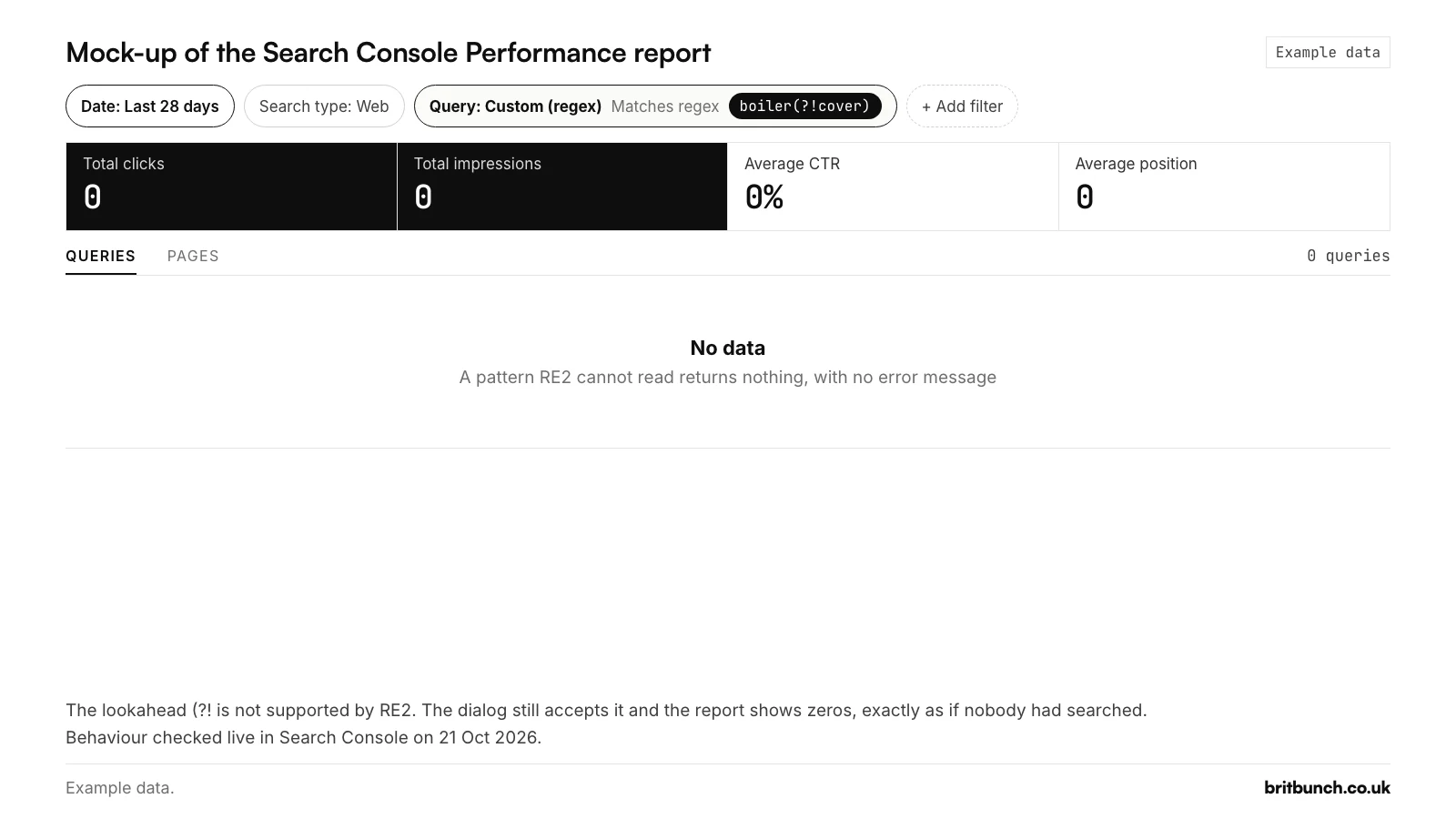
boiler(?!cover) applied as a Query filter. An unsupported pattern fails silently and looks like zero searches. Behaviour checked live on 21 October 2026. Example data.Example data. G3 finds 40 of 180 visible queries, 2,836 of 15,825 impressions (17.9%), 44 clicks, weighted position 7.2. G2 finds seven more, including "gas engineer rochester" and "landlord gas safety check medway": service searches in words G3's list doesn't contain. G3 only knows the services you give it, so add the words your customers use, synonyms included.
Postcode districts (G4)
Some searches include a postcode district, such as "electrician tn23" (an example search). G4 finds them:
\b(da1[0-3]|me[0-9]{1,2}|ct[0-9]{1,2}|tn[0-9]{1,2})\b
It shows DA10 to DA13 and ME, CT or TN followed by one or two digits, as a whole word. Requiring the digits stops "me too" and "ct scan near me" counting. Test G4.
Before you edit it:
- G4 looks for the district. A full UK postcode runs six to eight characters, with a single space between the outward code (the district, such as DA12) and the inward code. A full postcode typed with its space still matches, because matching is partial; one typed without the space doesn't, because of the closing
\b. - Postcode areas don't follow county lines. The UK has 121 geographic postcode areas, and they don't follow county or council boundaries. TN covers parts of East Sussex as well as Kent, and DA reaches into the London Borough of Bexley. A TN match is not proof of a Kent searcher.
- The DA part is the Gravesend end only. DA11, DA12 and DA13 are Gravesend districts and DA10 is Swanscombe. If you serve other DA districts, add them, and check each one, because some of them are in Bexley.
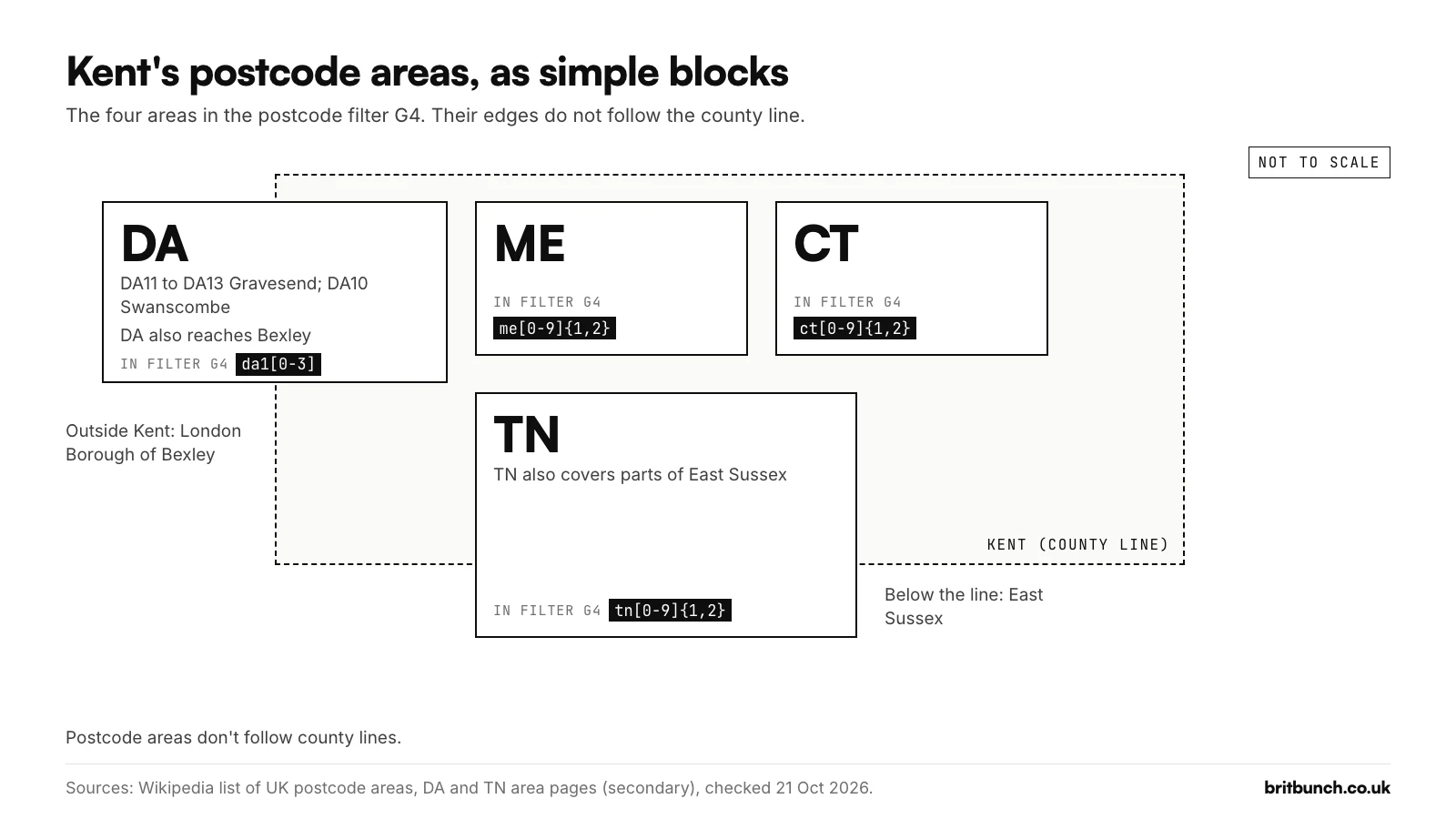
Example data. G4 finds 3 of 180 queries, "plumber me1", "emergency plumber me4" and "boiler service me7", 52 impressions at a weighted position of 6.8. Small numbers, but they name the districts worth mentioning on a location page.
UK qualifiers and spellings (G5, U1)
Some searches name the UK or one of its nations, such as "how much does seo cost uk" (an example search). G5 finds them:
\b(uk|united kingdom|britain|british|england|scotland|wales|northern ireland)\b
It matches whole words only, so "ukulele lessons" doesn't count. Example data: 9 of 180 queries, 914 of 15,825 impressions (5.8%), 3 clicks, weighted position 13.5, led by "how much does a new boiler cost uk".
British and American spellings split the same search in two. U1 catches both:
optimi[sz]|colou?r|cent(re|er)\b|organi[sz]|analy[sz]|licen[cs]e|jewel(le)?ry|catalog(ue)?|favou?rite
Each [sz], u? or (re|er) part accepts either spelling, so optimisation and optimization both match. Example data: 2 of 180 queries, "grey colour bathroom suite ideas" and "bathroom color schemes small bathroom", 32 impressions between them. Borrow its u? idea for the service list in G3.
Accents and the £ sign
RE2's \b only understands plain letters A to Z, digits and the underscore. Put it next to an accented letter or a pound sign and the filter can quietly miss the searches you wanted. We tested both in RE2:
\bcafé\bdoes not match "café near me".\bcaf[eé]does, and it also matches cafe typed without the accent.\b£\d+does not match "haircut £20".£\d+does.
So keep accented letters and £ away from \b. The price filter in our library puts the £ on its own at the end for exactly this reason.
Example data: Kent searches at position 7.9
Here are the largest rows G2 finds on the example export.
| Search | Clicks | Impressions | Position |
|---|---|---|---|
| plumber rochester | 3 | 240 | 5.2 |
| emergency plumber rochester | 5 | 210 | 4.2 |
| plumber chatham | 2 | 180 | 6.1 |
| boiler service medway | 2 | 170 | 4.4 |
| emergency plumber chatham | 3 | 160 | 5.1 |
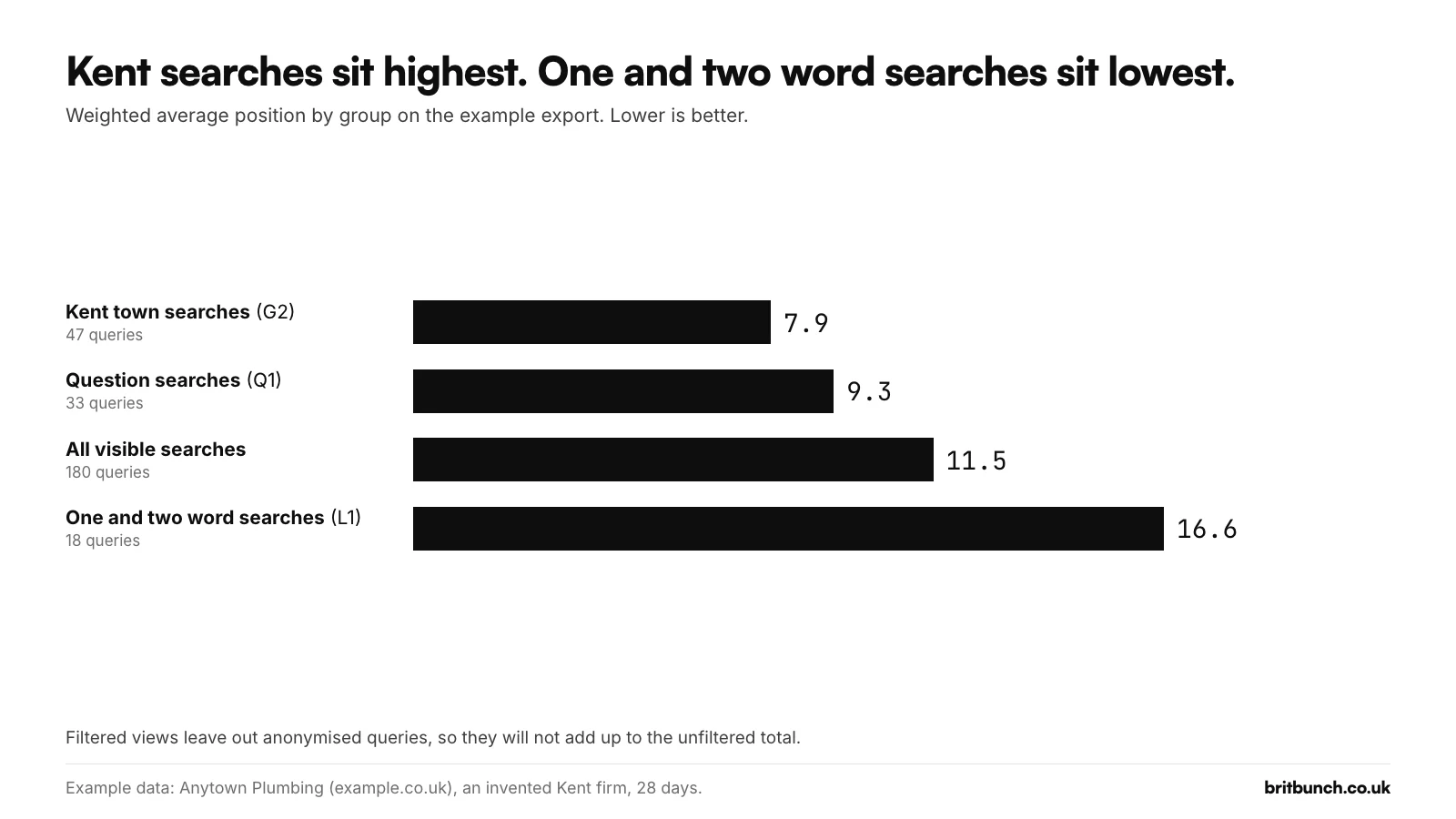
Example data: Anytown Plumbing (example.co.uk), an invented Kent firm, 28 days. Filtered views leave out anonymised queries, so they will not add up to the unfiltered total.
Across all 47 rows, G2 finds 3,196 of the 15,825 visible impressions (20.2%), 46 of the 134 visible clicks and a weighted position of 7.9. For comparison, all 180 visible searches sit at 11.5, the question searches (Q1) at 9.3, and the one and two word searches (L1), such as "plumber" and "combi boiler", at 16.6.
Sorting every visible search into exactly one bucket in the query sorter gives a similar picture: with brand, urgent and boiler-problem rows taken out first, the Medway and Kent towns bucket still holds 27 queries and 21 clicks (Example data, first match wins).
Two honest notes:
- Clicks you can't see. The example report shows 152 clicks, but the listed searches carry 134; the other 18 come from searches Google doesn't list, and some of those will be local too. Google leaves them out of the query table and out of any query-filtered view. Our regex guide explains where those clicks go.
- One row looks machine-made. One of the 47 is a 20-word search ending "my location is chatham, kent, england, united kingdom" with 9 impressions at position 8.3. Rows like it have been reported as tracker probes; our article on question and long searches looks at it. Read any row like that before you count it.
In the Pages tab of the example export, the four area pages (Rochester, Chatham, Gillingham and Strood) carry 17 clicks and 2,360 impressions between them (Example data). Pages are counted per page, so don't add that to the query numbers. For a local trade, searches naming the town are usually the group closest to the top of page one, and the ones most worth a page of their own.
Free: test your town and postcode filters before you paste
Open the Kent towns filter (G2), the service and town filter (G3) or the postcode filter (G4) in our free Search Console regex tester, already filled in. Swap in your own towns, services and districts, then check them against your own searches to see what each one catches and misses.
To sort a whole export into local and non-local groups, use the query sorter. All 50 tested filters are free to download as a CSV library and a PDF cheat sheet.
What to do next
- Find the page Google shows. With G2 applied, open the Pages tab to see which of your pages appear for those local searches. If it's a blog post rather than the service page you'd want, that's worth knowing.
- Location pages, only for places you really cover. Our local SEO in Kent guide explains when a page for a town helps customers and when Google's spam policies treat it as a doorway page.
- Your Google Business Profile. For "near me" and town searches, the map results can matter as much as the website. Our Business Profile setup guide goes through it step by step.
- Keep the view. A regex filter becomes part of the report's web address, so you can bookmark the filtered view and come back to it each month.
If you would rather someone set these filters up for your own towns and services, read the numbers with you and say plainly what to fix first, that is part of our SEO service.