
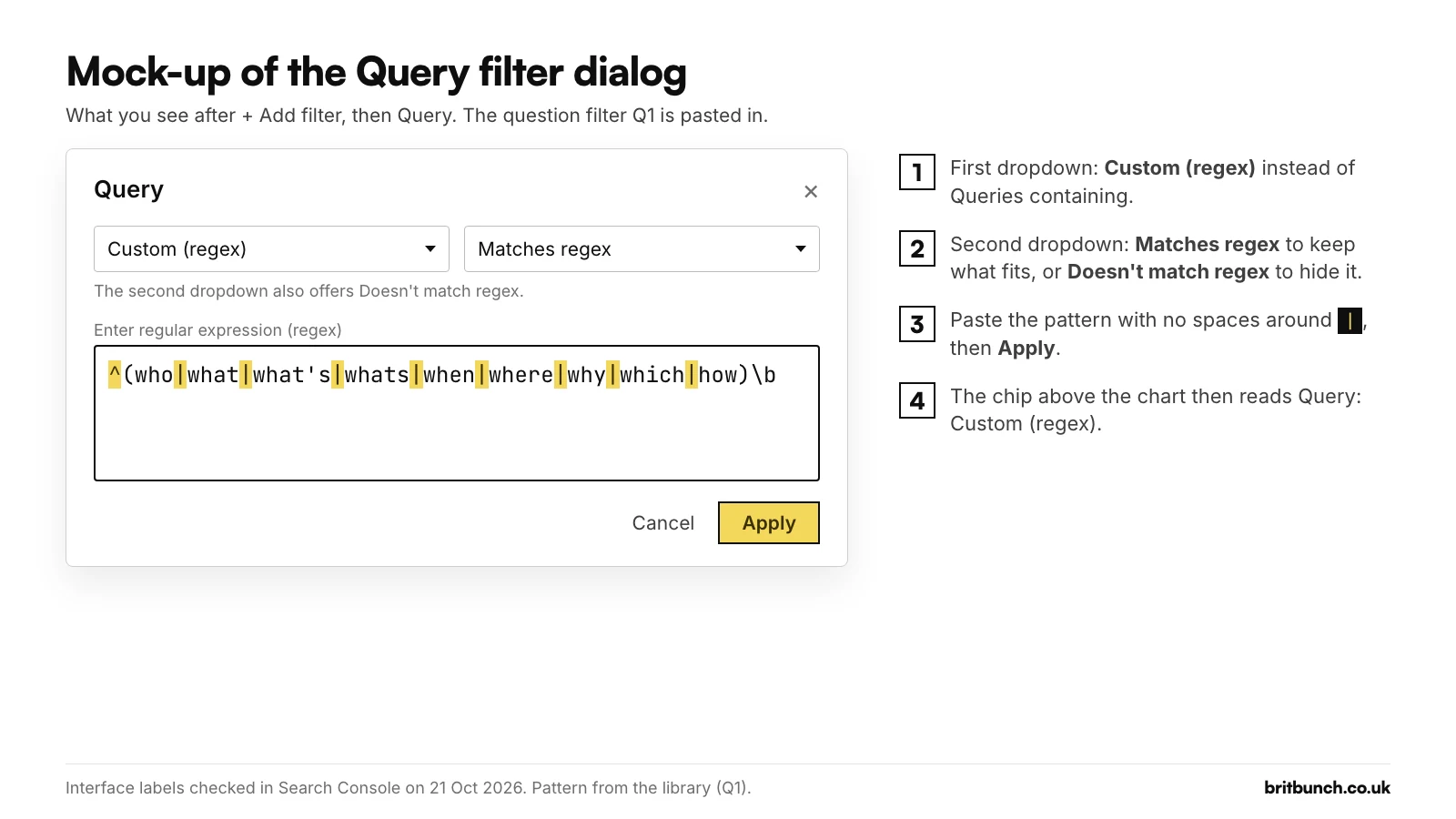
To find the questions people ask before they reach your site, open the Performance report in Google Search Console, click + Add filter, choose Query, then Custom (regex), leave it on Matches regex, paste the filter below and click Apply. The table then lists only searches that start with a question word. On the example export used through this series, an invented 28 days for Anytown Plumbing, a fictional Kent plumbing firm, that is 33 of 180 listed searches (Example data), and each one is a ready-made heading for an FAQ, a guide or a service page.
Search Console behaviour last checked 21 October 2026. The figures in this guide are example data for Anytown Plumbing, an invented Kent firm, not from any real property.
^(who|what|what's|whats|when|where|why|which|how)\b
Three rules decide what any pattern does. Search Console uses Google's RE2 syntax. It matches your pattern anywhere in the search unless you pin it with ^ (start) or $ (end). And it ignores capitals, so "How" and "how" count the same. All three are in Google's help page on advanced filtering.
Why question searches matter for a small business
A two-word search such as "boiler service" tells you the topic. A question tells you what the answer should say, in the customer's own words, which makes question rows a quick source of FAQ entries, blog topics and opening lines for service pages.
Google points the same way. Its help suggests using the Queries table to "find queries with high impressions and low CTR for opportunities to improve your page title and description" (Google), and notes that "You can use regular expressions to match several similar queries" (Google). A question filter does both.
The question filter, step by step
- In Search Console, open Performance, then Search results.
- Check the chip reads "Search type: Web" with Text-based selected. The Multimodal view (Lens, Circle to Search, image uploads) has no queries: Google says "the queries dimension isn't available when this search type is selected" (Google).
- Click + Add filter and choose Query.
- In the first drop-down choose Custom (regex). Leave the second on Matches regex.
- Paste the filter into the box labelled "Enter regular expression (regex)" and click Apply.
The chip now reads "Query: Custom (regex)", with a note: "Chart totals and table results might be partial when filters are applied." The pattern is saved in the page address, so you can bookmark the view.
Q1 misses yes/no questions such as "can I do SEO myself". For those, use Q2:
^(can|could|should|do|does|did|is|are|will|would) (i|you|we|my|it|a|an|the|they|your|our|there|this|that|google)\b
It needs a second word such as "I", "it" or "my" after the verb, which stops "will writing service gravesend" and "can recycling kent" counting. On the example data it finds 7 searches, such as "do i need a gas safety certificate as a landlord" and "can i service my own boiler" (Example data).
Search Console allows one Query filter at a time (when we tried to add a second, it reopened the first for editing), so run Q1, note the result, then swap in Q2. And a pattern it can't read gives no warning: it shows "No data", as if nobody had searched. Before you trust a zero, check the pattern in our free tester or our guide to regex that isn't working.
Why Google's own example over-matches, and the fix
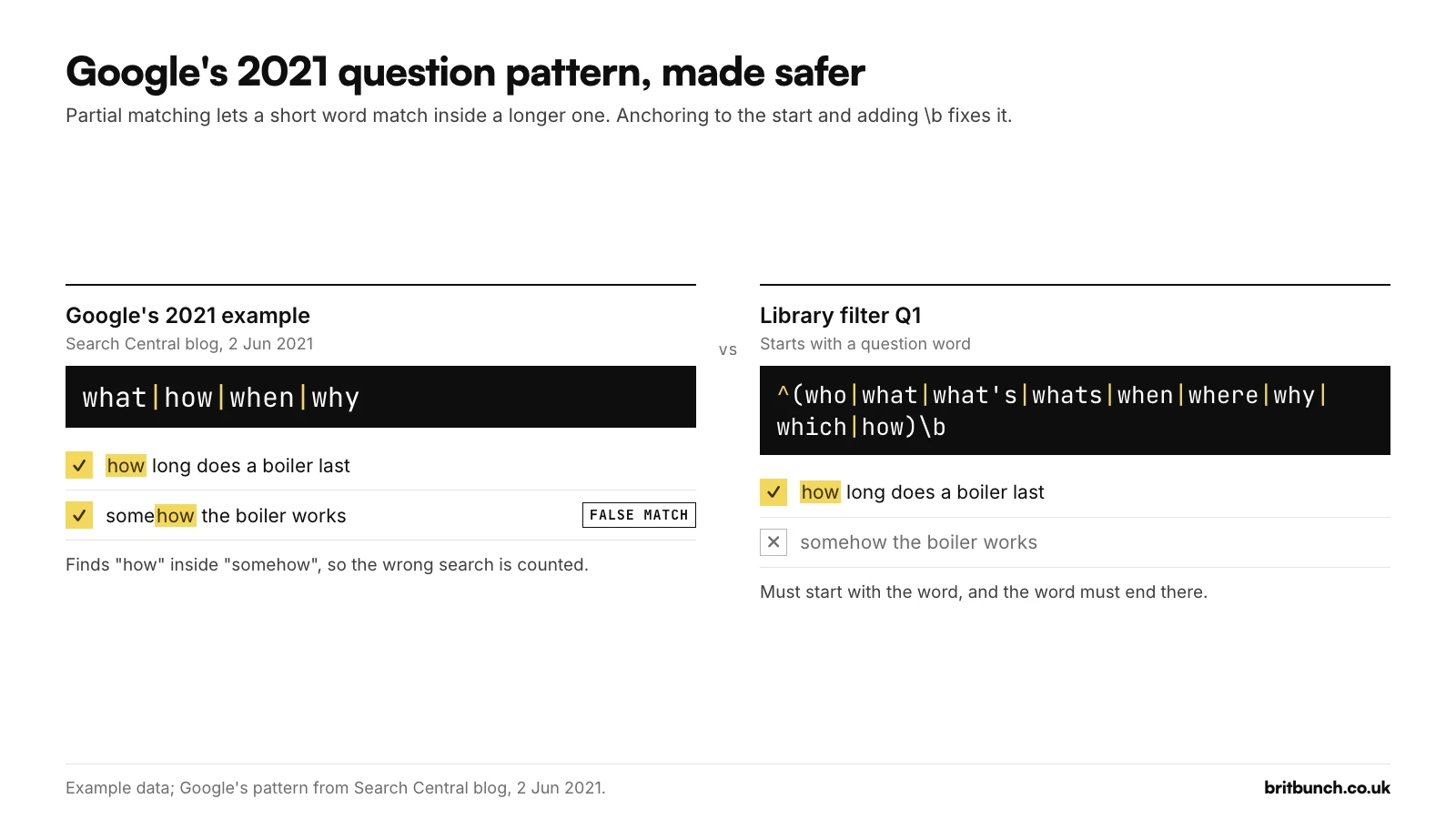
When Google added "Doesn't match regex" in June 2021, its announcement used what|how|when|why as an example. Because Search Console matches anywhere, that also catches "somehow" and "show", which both contain "how" (we tested it in RE2).
Q1 fixes this. The ^ means the question word must come first, and the \b after the brackets means "the word ends here", so "however" and "whatsapp" don't count. Q1 also adds who, where, which and what's. That matters: a question like "where is my stopcock", 120 impressions on the example data, starts with "where", which Google's 2021 list leaves out.
Example data: a quarter of visible searches are questions
Run Q1 on the example export, 28 days for Anytown Plumbing (example.co.uk), an invented plumbing and heating firm in Medway, Kent, and it returns 33 queries with 4,354 impressions, 23 clicks and a weighted position of 9.3. Those 4,354 impressions are 27.5% of the 15,825 on the searches Search Console lists. Example data: every row is made up, and nothing comes from a real property.
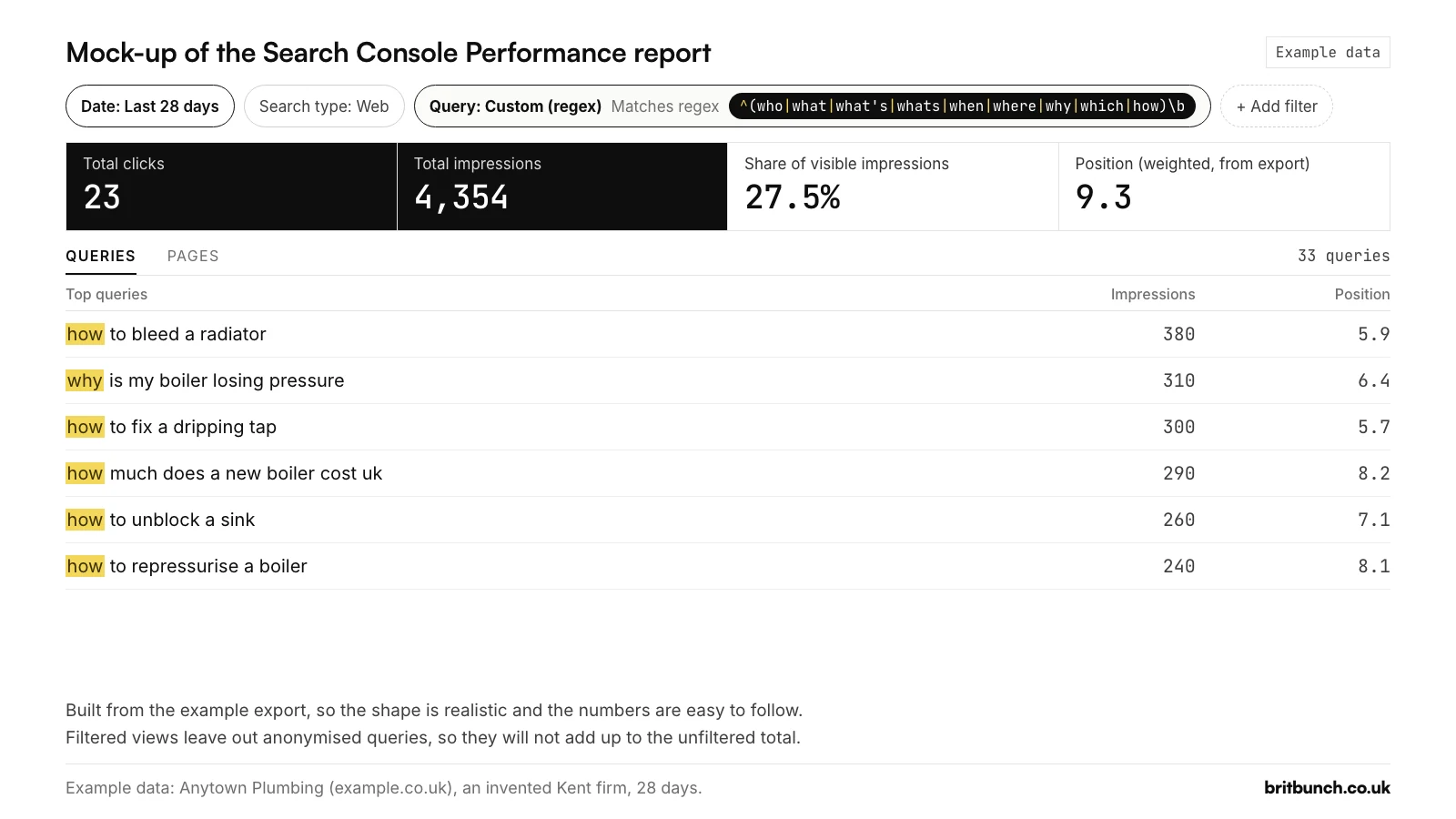
Position 9.3 is the foot of page one: shown, but rarely chosen. The top rows are jobs people try themselves first: "how to bleed a radiator" (380 impressions), "why is my boiler losing pressure" (310) and "how to fix a dripping tap" (300). For a plumber, each one is a guide that should answer in the searcher's words and say when to stop and call someone, so the next step is to use those exact phrasings in headings and opening lines, not to write another article on the same topic.
A quarter of the clicks in the example (23 of 134) come from question rows, but questions never bring every visitor. Google leaves out rare searches, which it calls anonymised queries: ones that "aren't issued by more than a few dozen users over a two-to-three month period" (Google, 2022). They drop out of any view filtered by query, so plenty of real questions sit where no filter can reach: in the example export, 18 of the report's 152 clicks are in searches no filter can see.
Sorting questions by job: how-to, cost and time, definitions, decisions
Each kind of question needs a different kind of page. Four filters from our library do the sorting; run them one at a time. The results below are from the example export (Example data: Anytown Plumbing, 28 days).
How-to questions (Q3): people trying to get something done.
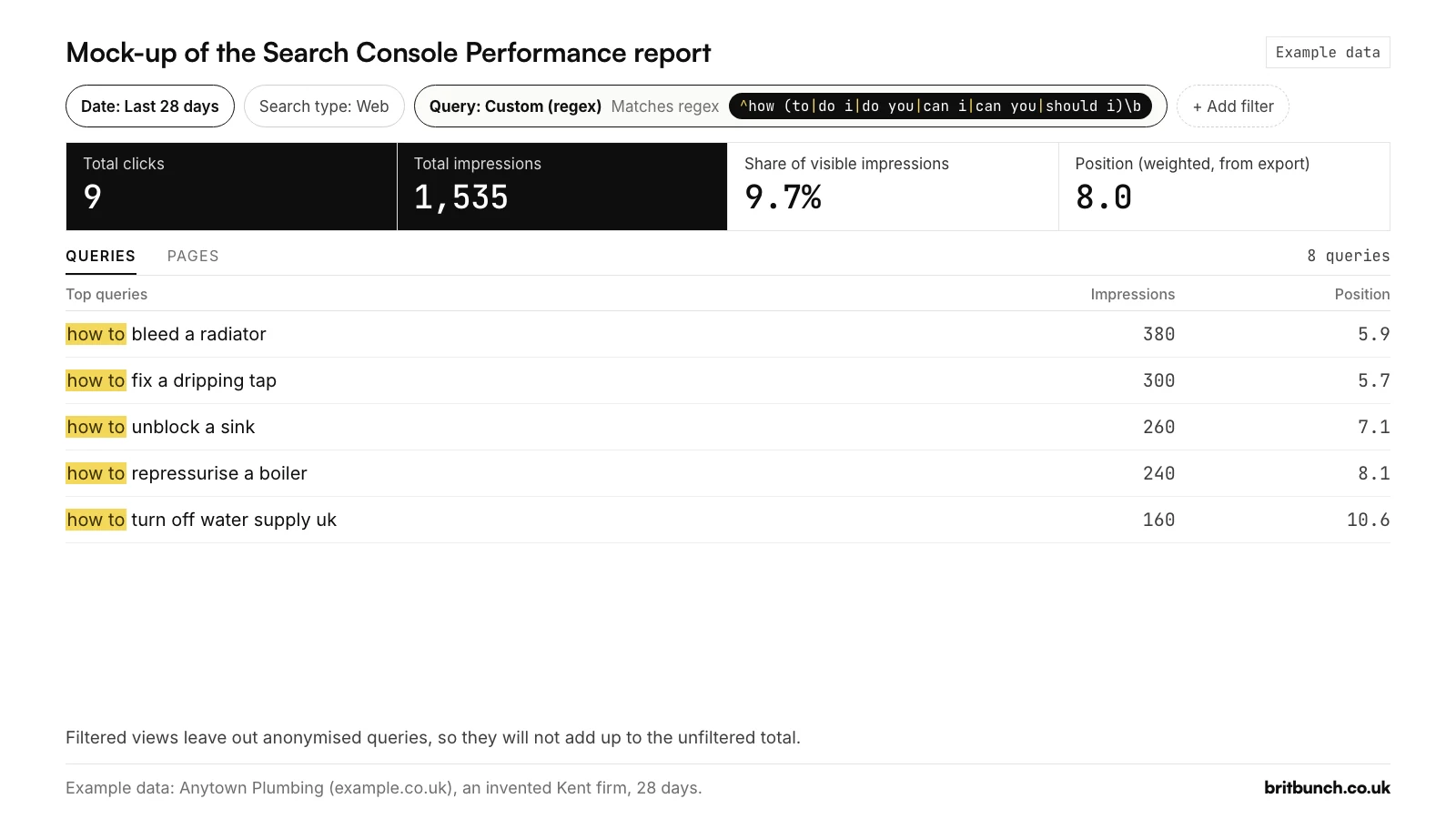
^how (to|do i|do you|can i|can you|should i)\b
On the example data: 8 queries, 1,535 impressions (9.7% of visible impressions), 9 clicks, weighted position 8.0. Answer them with numbered steps or a checklist. Test Q3.
Cost and time questions (Q4): how much, how long, how many, how often, how soon.
^how (much|long|many|often|soon)\b
On the example data: 10 queries, 1,259 impressions, weighted position 9.9, led by "how much does a new boiler cost uk" and "how often should a boiler be serviced". These deserve honest price ranges and timelines. Test Q4.
Definitions (Q5): "what is", "what are" and "what does" at the start, or words such as meaning and definition anywhere.
^what (is|are|does)\b|\b(meaning|definition|define|explained|stand for|stands for)\b
On the example data: 4 queries, 400 impressions, weighted position 13.8, such as "what is a combi boiler" and "boiler fault code meaning". One of the four, "what does a gas safe engineer do", is really a question about trust, not a definition: a reminder to read the rows, not only the count. Test Q5.
Decision questions (Q6): people weighing up whether to buy.
\b(worth it|is it worth|should i|do i need|pros and cons|good idea)\b
There is no ^, so the phrase can sit anywhere: "google ads pros and cons" counts. On the example data: 5 queries, 440 impressions, including "should i replace my boiler" and "is a combi boiler worth it". Write a balanced answer with costs, a clear verdict and when not to buy. Test Q6.
From question to content: FAQ, guide, service page
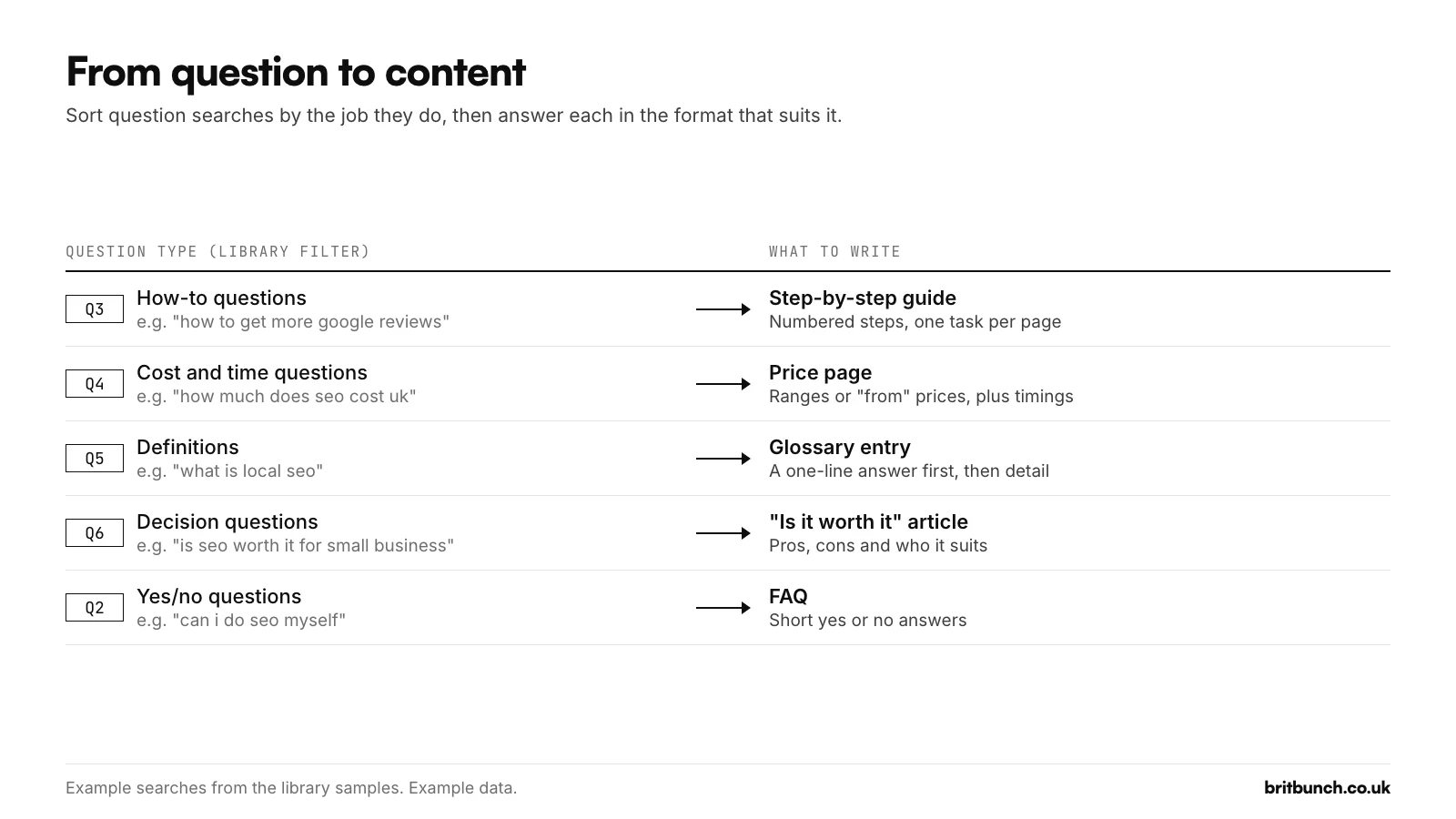
- How-to (Q3): a step-by-step guide or checklist.
- Cost and time (Q4): a price page, or a price section on the service page.
- Definition (Q5): a glossary entry, or a one-line definition at the top of a post.
- Decision (Q6): an "is it worth it" article that is honest about when not to buy.
- Yes/no (Q2): an FAQ entry that says yes or no in the first line, then why.
Before writing anything new, apply a question filter and open the Pages tab to see which of your pages appear for those searches, as Google's common-tasks page suggests (Google). If the right page is there but deep, rewrite its headings and first lines in the customer's words. If two pages share the questions, decide which one owns them. If nothing fits, write a page: Google's bubble-chart guide says, of searches where a site ranks low but is still clicked, "If you don't have a page, consider creating one" (Google).
Some searches ask for a thing rather than an answer: a template, a checklist, a calculator. CT2 finds them:
\b(templates?|checklists?|calculator|generator|tools?|spreadsheet|pdf|examples?|samples?)\b
The example data has three, led by "boiler service checklist pdf" with 90 impressions at position 6.3 (Example data), which is exactly the kind of row that should become a free download. On your site, each row like this is an idea for one. Test CT2.
Long-tail: 5+ and 10+ word searches
Long searches are not always questions, so two filters measure length directly. L2 shows searches of five or more words:
^\S+(\s+\S+){4,}$
L3 shows ten or more:
^\S+(\s+\S+){9,}$
\S+ is a word, \s+ is a space, and the number in curly brackets is how many more space-and-word pairs must follow the first word: {4,} means five words or more in total, {9,} ten or more. The ^ and $ make it check the whole search. Word counts are easy to get one out, so try a four-word and a five-word search first: test L2 or test L3.
On the example data, L2 finds 71 of 180 queries with 6,984 impressions (44.1% of visible impressions), at weighted position 10.8. L3 finds 7 queries with 444 impressions (Example data).
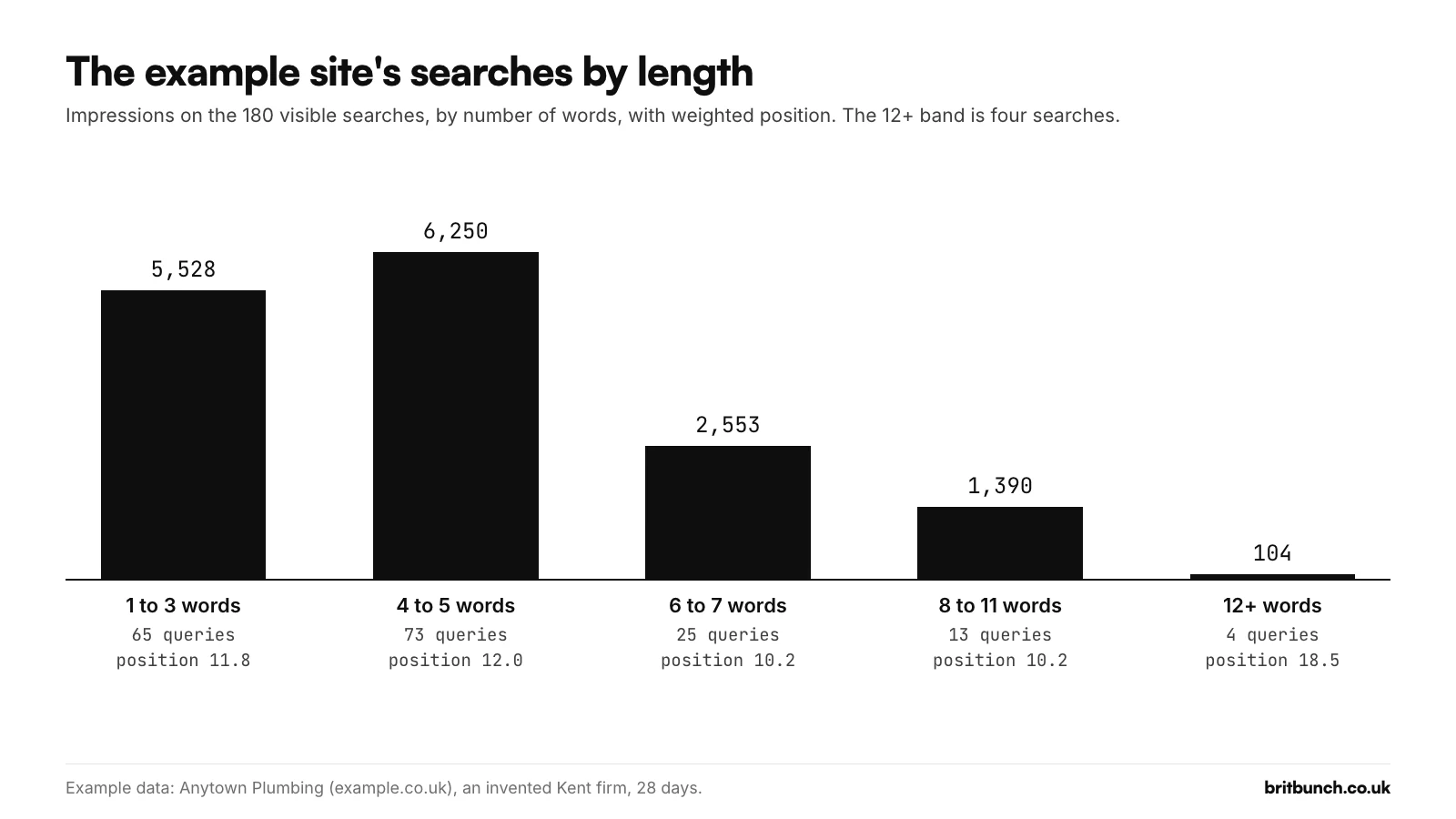
On the example data, searches of six to eleven words sit around position 10.2, a little better than the 11.8 for one to three words (both weighted by impressions): a specific question is easier to answer well than a broad term. The 12-word-plus band sits at 18.5 and includes a tool-style row explained below. Long searches are specific, so lift their wording into headings and FAQs.
AI-style searches: what Search Console can and cannot tell you
Long, chatty searches are often called "AI searches". Search Console can't confirm that.
AI Mode is inside the Web numbers
Google says AI Overviews and AI Mode are "reported on in the Performance report, within the 'Web' search type", and that when someone asks a follow-up question in AI Mode, "they are essentially performing a new query" (Google; Google). So AI Mode searches sit in your normal query list, unlabelled.
Expect them to be longer. When AI Mode began rolling out in the UK on 28 July 2025, Google said early users asked "questions that are two or three times the length of traditional search queries" (Google). In May 2026 it said "the average AI Mode search is triple the length of a traditional Search query", a US figure (Google). But a long search in your list could just as easily be a person typing carefully.
The Generative AI report has no queries
Google launched a Generative AI performance report on 3 June 2026 and says it reached all websites worldwide by 31 August 2026 (Google). It counts impressions only and has no queries (Google), so no query regex can separate AI traffic.
We checked the report in a live property on 21 October 2026. "Generative AI features" (marked Beta, under Performance) has tabs for Pages, Countries, Devices and Days, and no Queries tab. A Page regex does work there: a Page filter set to Custom (regex) for the blog folder narrowed the report to blog posts. So you can see which pages appear in AI features, but not which searches put them there.
Machine-looking rows: a 20-word "my location is" example
One row in the example export is built to look like the ones practitioners have reported:
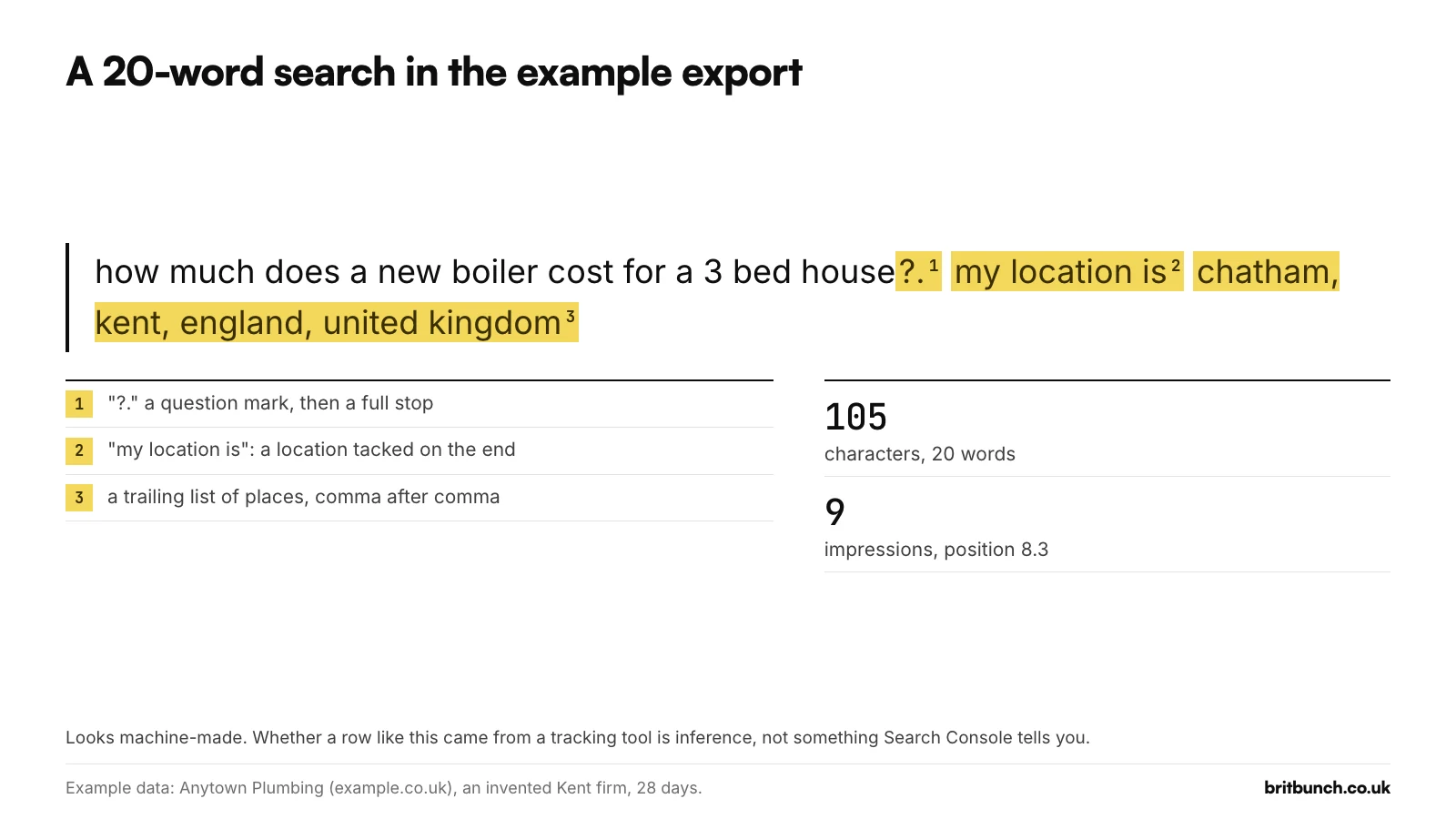
how much does a new boiler cost for a 3 bed house?. my location is chatham, kent, england, united kingdom
It has 9 impressions at position 8.3 (Example data). Note the question mark followed by a full stop, the phrase "my location is", and the trailing list of places. One SEO practitioner has documented rows ending "my location is usa." as automated probes from AI-visibility tracking tools, reasoning that real people don't search the same sentence every day for months (Suganthan Mohanadasan, 13 August 2026). Whether any row like that came from a tool is inference. Search Console doesn't say who or what made a search.
L4 finds rows like it:
my location is|\?\.|(,[^,]*){3,}
It shows searches containing "my location is", "?." or three or more commas. The comma rule also catches people typing lists, so read each row before excluding it. On the example data it finds just this one. If it finds rows on yours, exclude them before you judge click-through rate, and check none of your own tools sent them. Test L4.
The viral AI regex measures length
A regex for spotting "AI prompts" appeared in several SEO guides in August 2026. When we tested it in RE2, it matched searches of 11 words or more and nothing shorter: it measures length, not AI. It also contains curly quotation marks inside one of its brackets, so check any pattern you copy from a web page before pasting it.
ChatGPT is a separate case. In October and November 2025 some site owners saw full ChatGPT prompts in Search Console, each starting with a ChatGPT web address. OpenAI did not confirm the details directly but said it had fixed a temporary error that affected a small number of searches (heise, 8 November 2025). A long query without that prefix is not evidence of ChatGPT. Treat length (L3) and fingerprints (L4) as clues, not proof.
Put it in a dashboard: the query sorter's question and length buckets
To see questions, long searches and AI-style rows side by side, use our query sorter. Download the Performance report, drop the file in, and every query goes into a bucket. Questions (Q1) and AI-style rows (L4) are in the default set; add L2 and L3 from the library as length buckets. Each bucket shows clicks, impressions and an approximate position.
Free: the question and length filters, ready to use
Every filter in this guide, plus 40 more, is in our free library, each with a plain-English explanation, sample searches it should and shouldn't match, and its result on the example export.
- Query sorter: drop in your Search Console export and see questions, long searches and AI-style rows as buckets. Your file is read in your browser.
- Regex tester: check any pattern against your own searches before you paste it into Search Console.
- All 50 filters as a CSV and the cheat sheet (PDF).
If you'd rather hand it over
Finding the questions is quick. Answering them well, page by page, and checking a month later whether positions moved, is steady work. If you would rather someone else did it, content and local SEO are part of our SEO service. If not, everything above is free, our Search Console regex guide explains the symbols, and the library of 50 filters has the rest.